Showing posts with label Wyze. Show all posts

Monday, December 9, 2019

Answer to: I just want a decent system

The problem

Decent is pretty subjective. Kind of like asking what is the best way to get to work. You'll get answers from ride a bike to only a Karlmann King will get you there. Not only is it subjective relative to what they need and can afford it is subjective relative what they have actually tried model wise and using the resulting video. As one installer put it "I have to explain to my clients that if you have only ever ridden a horse and someone gives you a small compact car, you are gonna think it's awesome purely because you don't know you can get a Range Rover or a Truck for the same money."

But you still just want something for outdoors

If you just want to get 4 outdoor cams to cover the yard around your rectangular house you could start with this 4 4MP cam bundle from Reolink though I think it was like $50 cheaper last week. Still $341 is not bad to get you started. You can reuse the cams later with about any NVR. They are pretty decent for the money. And the NVR is speced for 8 cams so will probably cover you unless you need more features or go nuts buying cams like me. (60 cams as of this writing on 4 serversNote though you might have a time getting non Reolink cams to work with it.

Better yet if you have a PC not doing much,  get the Reolink RLC-420 cams and a copy of Blue Iris. Note however Blue Iris 5 seems to have developed issues with some cams (including Reolinks) that Blue Iris 4 does not have.

But you still just want something for indoors

Now if you are looking indoors and wireless get some Wyze cams. Pretty much a toss if you want to upgrade later but you are talking about $100 for 4 plus some SD card you can probably reuse if need be. And they come in handy for monitoring things where you want a temp setup or need to get something in place quick. But you read this about the issues with wireless.

On the other hand a bit of research could save you time and money 

The above setups will help you get a feel for the low end. But if you want to do the research up front to get the most bang for your buck you can start reading my post "What is the best camera for X?" to sort what specs you need to be looking for the match what you want to monitor.

Wednesday, August 28, 2019

Wyze RTSP updates

As mentioned in Should you get a Wyze cam? Wyze has released updates to the RTSP firmware versions (old link).

"Update 8/10: Went to add a Wyze V2 out by the gate now that I have power and found they updated the RTSP firmware so though it might now do person notifications. It has disappointing video compared to the 720p Foscam I hoped to replace. And the sensors seem iffy but I'll leave it a bit to see how well the person notifications work."

It even looks like there is now a beta available of the next release. (See below.) So from now on I'll have to note which version the cam I'm talking about is running. The above was in reference to firmware demo_V2_RTSP_4.28.4.41 on a cam I was planning on using at the gate. TODO: add link to Wyze / Foscam compare and how sensors stopped working on 87 in heat.

First off despite the option to turn on person detection showing up for just the latest of my Wyze V2s when I added it and only for that cam for some reason, person detection is still not supported in RTSP firmware. I confirmed it did not work with the demo_V2_RTSP_4.28.4.41 firmware.

I started this post as an update to the above and on the Pan RTSP firmware. See related Pan video. So I went to my downloads folder to get the version number for the Pan firmware and noticed the last version I downloaded on 8/25 appeared to have an older version number (demo_Pan_rtsp_4.20.3.48) than the one I had downloaded before on 8/10 (demo_Pan_rtsp_4.29.4.41). Interestingly when I went to my tablet to confirm which I had installed on the camera the app would not even finish loading. Even after a repower. I had to install the Wyze app on my phone to go check that it was indeed demo_Pan_rtsp_4.20.3.48. The reason seems to be conflicting info. In this post the later firmware is listed both as beta and the current version. demo_Pan_rtsp_4.29.4.41 appears to be the same 5/10/2019 update form the pan beta zip. Note they have started making links to the bin files now instead of the zips and you can not see the folder listing online so file compile dates are now hidden. So it looks like I still need to update my Pan cam. Note with RTSP you can not update the camera from the app. You have to do it manually via the SD card.


Sunday, August 25, 2019

My current setup

Here is the latest picture of my setup as of 5/23/2022 (See older pics below. in History)


All cameras servers linked into my home automation so it can highlight cams groups on consoles based on various sensors being triggered. And send alerts based on what is "seen" moving. As in someone opening the parcel box at the gate will always trigger the cams pointed that way and switch that console to show the cameras pointed that way as well as sending alerts that a person is out there and probably which delivery service they are with if they pulled in. Critter motion at the gate though only highlights the cams on the console those cams are on but no alert is sent unless it is a coyote, person or vehicle driving further in.

Note the 70 inch display shows the site wide distributed video stream and can be used as a third monitor for my workstations or watching TV from several sources. The camera consoles will highlight (just show) groups of cameras when triggered by Homeseer based on triggered motion or contact sensors. Depending on which sensors and the current alarm settings the main video stream may be switched to that camera console as well. Triggered sensor also give verbal notifications. So for instance if motion is sensed at the gate with a glance I can see if I'm getting a delivery or a visit from wild live or a neighbor's escaped livestock from any where there is a TV. 

A quick and simple video show how my system was setup to return from triggered events with one voice command.

Here is an example of a guy looking for stuff to steal. Since I live in a neighborhood of mostly 5 to 10 acre lots seeing anyone is pretty rare. Predators and loose livestock are a much larger issue. So as I was in the middle of conference call I ignored the first alert but when a second came I could easily make out the guy trying to pull the motion sensor off the tree. Unfortunately he took off before I got down there but he did not get anything and if not for this setup I might not have known he was even about much less had video from 5 cams and good screen grabs of his face for the neighbors and cops.

Future Goals (in no order):

  • Switch from DeepStack, which is no longer being updated or supported, to CodeProject.AI once it calms down a bit and is more stable.
  • Upgrade models to YOLOv5
  • Use the tons of images I've been saving since I last built models to create new versions.
  • Write custom trainer to better streamline adding images.
  • Look into merging my custom models into one. Want to see if this works better or worse than seperate ones.
  • Get MQTT working to link in more sensors and response devices.
  • Add and upgrade cams (of course).

History:

This is how it happens. Your setup just grows and grows as things happen and tech improves.

February 2023

Coming up on 2 years since last update so figured I should update though most of the changes are not really obvious. Mainly as far as Blue Iris is concerned that as mainly been adding DeepStack and then creating custom models. Not just telling cat vs dog/coyote vs raccoon/opossum/skunk/armadillo vs pig/cow/horse/deer but also things like kind of vehicle or bird plus working on fire and smoke. Now that it can ID what is moving fairly well, coupled with my Roku defaulting to showing all my security cams, I shutdown the switching the distributed video to show a console automatically depending if the alert and alarms levels are high enough. Switching views in the Roku is way faster than switching consoles to follow someone thanks to High-bandwidth Digital Content Protection (HDCP). Also been a bit side tracked with weather, you might have heard about the Texas ice storms' tree damage, and the drought that came between them that caused me to some of the creek critters indoors.
large aquarium setup

April 2021

Most of the changes, other than the added Blue Iris server are not really obvious but since it has been almost a year I thought I should post an update. What is new / changed:
  • Moved sky cams and weather images to separate server in prep for more upgrades to house cams.
  • WeeWx moved to Pi4 mounted on back of dedicated display. (On shelf on left next to Davis console though not showing weather info in current pic.) Mainly so I could move the Linux server WeeWx was running on to the shop server room since the connected Davis console needs to be up here.
  • Added cam in bedroom to keep an eye on the cats that automatically goes off when I enter or the home goes into "bedtime mode" and only comes back on when both the bed room and server room doors are closed and the alarm is disarmed. (Both are connected to master bath so this makes sure the cam is always off, as in pic, when I might be in the room.) See Averting your eyes for details.
  • Several cams upgraded. As you can see the Wyze cams are only getting worse (3 of the 4 cams showing offline in pic are Wyze cams) and I'll be replacing most of them in the next round of upgrades. The Hikvision ColorVu G2s and the Dahua IPC-HFW2831T-ZAS-S2 are my current favs.
  • About ready to install 360 sky cam of 4 ColorVu G1s mounted on a single high pole. Hopefully will be able to gen 360 "cylinder" view videos with it but worst case will get better sunrise and sunset views. Once done the "old" (2 were just upgraded to G2s to get 2 G1s for the new array) sky cams will be retasked and or used as upgrades.
  • Using Blue Iris on Roku more that than main stream switching as seems to be somewhat faster than waiting for the the HDMI copy protection nonsense to handshake through the whole system.
  • Added faster workstation for programming and video editing that has the same 3 monitor and broadcast access as the older one letting me mix and match views from both. The old workstation alse clones its broadcast feed to the far left monitor when that monitor is not in use as a secondary monitor for my work laptop. 
  • A lot of infrastructure stuff like adding capacity to the shop server room and moving a lot of stuff down there to distribute the load. All accessible via remotely of course over dedicated lines.
  • Added testing repair station (off camera) with own PC, monitor, POE switch, Pi monitored UPS and tool set for testing, repairing and upgrading hardware including cams.

April 2020

Took 6 tries to get a pic with all the cams on screen without disabling all the automation.

March 2020

4/1/2020 pic snapped quick while all cams idle so showing which means project data extra hidden to avoid work questions.

  • 4 Blue Iris ( 3 with BI4 and 1 with BI5) servers with 27, 15, 9 and 12 cameras on them. 63 total plus the Ring doorbell. With average loads of 877 MP, 1076 MP, 540 MP and 635 MP respectively.
  • LPR plugin is pretty much a bust
  • Pulled all outside dome cams, save the entry way which is sheltered, due to how often they need cleaning outdoors if exposed to rain / sprinklers. Also replacing with higher rez and or lower light performing cams.
  • Shifted an lot of cams around to upgrade rez and or lower light performance.
  • Loving the ColorVus though there are some issues if the light level drops below that of a half moon and of course the lack of varifocus / zoom options.
  • 3 ColorVu sky cams now cover over 3/4s of the horizon. Adding a 4th to fill in the last bit in April. plus have 2 others covering parts of the outdoors hard to cover with lighting IR or visible due combos of reflection glare and distance. 

January 2020

61 working cams (not including Ring doorbell) now, building a server upgrade and a compare of loads between servers.  Also more automated lights, more tree trimming and feral pigs have made my place part of their territory. Have some more lights and trimming to to do then I need to made a video of how the whole works together.  Ring test video can be seen here.

November 2019

After the intruder and something causing the dogs to hang out by the east gate I got the east gate cam back online with 5 MP and trimmed the trees for a better view.


October 2019

After a rat snake got in the shop and then disappeared without me finding where it or the mice before it got in I added 4 more Wyze V2s to track and track where things might be coming in and or where the snake might be in the shop still.

August 2019

Added 4th Blue Iris server and dedicated monitor and increased main monitor to 40 inches
Here is a mountain lion spotted in my neighborhood few believed in till someone caught it on a security cam in a nearby neighborhood.

May 2017

Added 11th screen (not counting the unused laptop one.) 3 dedicated to cams. Note too indicator lights added behind cam monitors.

May 2016

10 screens, 2 dedicated to cams.

May 2015

Bookshelves added.

August 2013

Mid digital conversion. you will notice 29 low rez cams on the Blue Iris monitor. Some are new IP cams and some are being pulled from Geovision servers,

May 2013

2 screens switched to larger portrait mode ones.

January 2012

Using 2 Geovision (analog cam servers) here with another down at the shop. Starting to standardize on 1080p monitors too.

December 2011

Just the one 16 cam Geovision server at the house here. Note how dark some of the cams are.

November 2010

5th added. Note upper right monitor was switchable between TV and computer monitor so I could watch digital sources on it.

October 2008

4th screen added for second Geovision server.

October 2008

Soon after I moved. 3 screens but no dedicated monitor for cams and even the big screen was analog.


July 2008

Moving in

June 2007

At the old house


Sunday, August 11, 2019

Doing the math on pixels per inch at a distance for your cam

If you think zoom and enhance is a real thing I have some bad news for you. You can guestimate a pixel that might come between two but that is not really adding detail. It is just making it bigger. Even with some sort of fancy AI like in No Way Out it is just going to convert the image to something like you expect to see. Like seeing faces in the clouds. Just think about it and it should be obvious, pixels can not magically resolve into something the camera did not see. The best you can do is monkey with contrast and brightness and maybe a bit motion fix if you are luck. So you need a minimum of in focus pixels snapped at a high enough shutter to reduce motion blur with enough light and or sensitivity to have the contrast to work with.

Yet I'm still seeing a lot of posts where people are talking up static focus 1080p cams with wide angle for outdoors. Let's do the math on that. There is a simple calculator online to get the width of the area being viewed by a cam with a given view angle. For example let's take my old work horse the Foscam 9800 series that is 720p and 70 deg view angle.

So at 20 feet the view width is 24.4 feet or 293 inches. 720p resolution is actually 1,280 pixels so when we divide the pixels by the view width you get  4.3686 pixels per inch. So a face, about 6 inches wide will be 26 pixels across at 20 feet with this cam. 40 is considered to be the min. So even with the best lens focused for 20 feet this is still not going to cut it.

For convenience I worked up the charts below from my compare sheet. Note these charts assume the camera is focused for the target distance and not the upscaled resolution some cams advertise. Despite claims, outdoor fixed focus cams seem to be focused at around 20 to 30 feet. You might get a "decent 2X screen grab" of targets within +- 10 feet of that. Of course for a large range of  depth you really should look at a camera with auto focus like the Reolink RLC-411WS I've tried. Though it has had the occasional glitch as well. For long distance something adjustable like the Microseven 6-22mm 3MP Manual Zoom Varifocal Len HD 1080P. Or to get an idea of what you might be able to see with a certain model in your location try IPVM calculator which lest you stick a cam on a map of your property to see what the view angle looks like and has simulated day and night shots at the distance you give.


Not those are best case numbers under perfect conditions. While 7 pixels per inch is bare min 14 is the more accepted min. If I change the wanted pixels per inch to 14 the last chart becomes

Note 12 degrees is a fairly extreme telephoto lens in the range of 22mm
70 is standard though up to 90
between 90 and 130 is often called wide angle
180 to 360 are often called 360 view cameras

For a more indepth info look here.

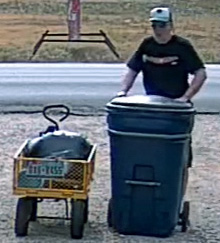
For a visual compare here I am about 33 feet from the cameras.
First an old Foscam FI9804PS 720p and 70 degree view angle

Now compare that with a Reolink RLC-511-5MP with auto focus but zoommed to widest view of about 90 degrees.

We can obviously see a lot more  and it looks clearer. Just for comparison here is the view from a 1080p  M7B77-WPSV1 at max zoom to a view of about 12 degrees located about 190 feet way.

The main diff appears to be the angle .

Now crop the images down to just me and the cart and make them the same size for a recognition compare. Note the sizing is done by the browser. You might interpret a bit more with a smart resize.

The Foscam image cropped
The Reolink image cropped

Lastly the Microseven image cropped.
So a 1080p cam with a 12 degree angle and focused for distance yet almost 6 times the distance away would be better for pulling a plate at the gate than the 720p with 70 degree view. Obviously the 5MP at the gate wins though probably by not as much as you would have thought. I should note here too the Foscam was only doing about 1 fps till I ran power out there so I hook up and access point via Ethernet Over Power. I did that so I could stick a Wyzecam V2 out there but that was a bust. Given its 110 degree view you get a shot like this.

First here is the Foscam from the Wyze compare test. I'm a bit further out in this one about 60 feet from the cams. You can see the zoomed Reolink image behind it. Note images were resized to match width of widest image (the Roelink).

Here is the save shot form the Wyzecam V2

And the uncovered Reolink zoomed to its max of 31 degrees horizontal.
Note the glitch in the pic turned out to be a config Blue Iris issue. Inspect sets it to be a generic RTSP and you want to set it as a Reolink.
And lastly a similar shot with the Reolink unzoomed.

In case you are wondering here are some shot with me much closer.
Foscam shot of me at the parcel box
Wyzecam V2 shot of me at the parcel box

One last distance compare back down the drive about 85 feet from the cams. Between the Microseven still zoomed the max.

And an Amcrest 4K IP8M-2496EB with about 112 degree view angle.

For those that think you can just zoom in, here is what you see if you zoom in to match the Microseven.

But there is one more factor to consider, focus. Autofocus can add a lot though when it gets it wrong it can make your cam useless too. Here is a close up shot with the Foscam where I'm just 7 feet away. The cart maybe double that.
Note the plate looks good but the logo on my cap is blurry. I'm too close for the range this cam is set too.
Here is the same shot from the Reolink zoomed out to the max.
Notice both my face and the plate are in focus because the camera has adjusted.
The down side, something flying too close to the lens can leave you looking like this.

Sunday, August 4, 2019

Should you get a Wyze cam?

I'm seeing that question a fair bit these days. The answer is of course it all depends on what you want to do with a cam. For instance 6 of the 51 cams I currently have online are Wyze. And I have a 7th I'm planning on replacing an old 720p cam at the gate watching the mailbox with. But you need to think about what you plan to use it for.  They are great for places you want to setup something quickly to monitor something. Or in a place like out at the gate where it might be easily stolen so you want something with audio but cheap. For example only 2 of the 7 will be mounted in a permanent way. Compared to others here are the pros and cons I've see running them 24/7 in RTSP mode.

Wyze Pros:


  • Cheap (~$30 with shipping) though for the "3 times the price" I often see quoted you can get some really killer cameras. I just picked up 2 Amcrest IP4M-1026EWs for $64 each for example. For ~4X the price you can get 5 MP with zoom and auto focus or even 4K for example.
  • Can record local and to free cloud (and to NVR with hacks or one off supported firmware)
  • Easy to setup. I have 3 in the barn just stuck on walls by the magnetic base.
  • Wide 110° view. Good for getting a good bit of the room though not as good for distance without a lot more pixels.
  • They are adding person recognition to cut down on "bad" notifications. I have not had a change to try this personally though so not sure how well it is going to work given the limitations of the camera hardware and bandwidth if attempting a cloud solution. Update 8/10: Went to add a Wyze V2 out by the gate now that I have power and found they updated the RTSP firmware so though it might now do person notifications. It has disappointing video compared to the 720p Foscam I hoped to replace. And the sensors seem iffy but I'll leave it a bit to see how well the person notifications work.  Update 8/28: see Wyze RTSP updates.

Cons:


  • Only WiFi and the WiFi is weak. Expect a lot of drop outs if you plan to stream to a NVR. I suggest putting any WiFi cam on a smart plug so you can restart it remotely if not automatically.
  • Just 1080p which is the bare minimum these days given how cheap cameras have become. Especially with a 110° view. Remember one of the main factors in recognition is pixels per inch at the target distance. Take a look at Doing the math on pixels per inch at a distance for your cam
  • USB powered which generally means power nearby.Though some have reported being able to use POE to USB adapters. At that point though you are talking similar price of cams with POE built in.
  • Indoor cam by design. While there are cases that are supposed to shield it from weather again that negates most cost savings. Also this does not change the in focus range of the camera which is setup for medium size rooms. Having the target in the focus range of the camera is the other main factor in being able to recognize the target. Though focus range can also be an issue with many cameras since most these days are not just fixed focus but glued in place to prevent altering so it is important to match the camera to the target. 

Note for non RTSP use:

It only triggers once in 5 minutes and only uploads the first 12 seconds of that. Does record local 24/7 though and you should absolutely do that. While the cloud recording is a nice backup you really should not count on it catching anything, especially outdoors, since the odds the movement the first triggers it will get the best 12 seconds of video for you are about the same as hitting green light in city traffic when you are in a hurry.

Also for those thinking of using outdoors.

Think about what you expect to see with this cam. As I said above this camera has a wide view for such little resolution. Compare the view of this old Foscam 720p cam
Foscam with 70 degree view angle

Here is the same shot from a Wyze cam V2 located next to the Foscam
Note the motion pixilation in the shadows

And a similar shot from a 5MP Reolink one of those 3 times the price cams mentioned above.
Reolink 511 in wide view mode of  90 view angle

More info:

To see more of what I've done with Wyze cams see my other posts here and samples I've posted on YouTube.

Friday, September 28, 2018

Quick overview

At the moment I've have 38 cams from several brands on 3 Blue Iris servers plus one each of the Wyze cams. I've tried almost that many models. Here is what I've found.

I like the clarity of the Reolink 5MP the best.

But I've found the Reolink 5MP bullet cam can have trouble in Texas heat. When temps got over 100 here the Reolink's auto focus and zoom motors stopped working then the camera just crashed. For awhile it was also losing its configuration I bought the dome version and have not had any trouble with it. Heat has not seemed to be an issue with any others except the old Foscam 8900 PTL series OEMs made for indoor use.

IR reflection bad be really bad in some of these. Dome cams almost all seem to have this to some degree. You should look at the pics here but in general I would recommend the Amcrest, Hikvision or Reolink bullet cams for that.

Wifi range varies a LOT. For example at the turn in my driveway some 80 feet through heavy woods the Amcrests, Foscama and Escams all worked most of the time. Reolink, Hikvision and SV3C were iffy and the Wyze cam could not even connect.

Friday, September 7, 2018

Running a camera on battery


What I wanted to achieve.

I wanted to get a cam on my mailbox which across the street. But the closest place to an outlet that could get line of sight is over 300 feet from any building and across the driveway. So we are talking major construction to run a line or POE cable out there. I already have a couple cams down by the creek running longer distances from my super AP ( a UniFi AP Outdoor+ with a Ubiquiti Airmax Omni AMO-2G10 10Dbi 2.4 GHz Rocket antenna) so I started to wonder what kind of battery would it take to power a camera.

Experiment 1

Hooked a Foscam FI9804P 720P Outdoor HD Wireless IP Camera to a 12V 9Ah Compatible Battery normally used in pairs in my UPSs and it ran 35 hours.
Temp UPS battery setup

Experiment 2

Same Foscam FI9804P 720P Outdoor HD Wireless IP Camera but with a Duracell Marine Battery (Group Size 24) and it ran about 6 days. Was not sure it was fully charged since that seemed short so switched it back to the UPS battery which only lasted about a day this time. Running it dead might be taking a toll on it. Put it back on the big battery and up for 6 days so far.


Experiment 3

After talking to a neighbor and looking up some specs I started thinking a Wyze cam v2 might be a better way to go. About 1/2 the power draw, has audio and 1080p instead of 720p. Also smaller and needs less IRs to see so less visible. Of course the downside is it only records to the cloud and SD card right now unless you seriously hack it. Also not sure about its WiFi range but will make a good experiment. I'll first try it in parallel with the Foscam on the big battery and the Wyze on the UPS battery. Since it is an indoor camera I also bought the Frienda Camera Cover for Wyze Cam 1080p HD Camera and iSmart Alarm Spot Camera, Black Skin Cover with Security Wall Mount, Weather Resistant, Against Rain and Dust and some adapters to power USB off a battery. Camera, cover and 25 foot power cord total cost just $46.96. Add another $9.99 for a 32 GB SD card for redundancy sake.

Here is what it looks like with the cover on. It is a rubber like material which should seal it pretty good.
From front

From bottom
Ran into a problem with the power adapter I rigged up from WINOMO Car Auto Battery Terminal Clip 12V DC Cigarette Lighter Socket Adapter and Car Charger RAVPower 24W 4.8A Mini Dual USB Car Adapter with iSmart 2.0 Tech, Compatible with iPhone X 8 7 6 Plus and Galaxy S9 S8 Plus S7 S6 Edge Note 8 - Black seems the RAVPower is not long enough to make contact in the WINOMO. Ordered a Anker 24W Dual USB Car Charger, PowerDrive 2 for iPhone X / 8/7 / 6s / 6 / Plus, iPad Pro/Air 2 / Mini, Note 5/4, LG, Nexus, HTC that will hopefully work better.
 This appears to be a failure because the Wyze cam will not connect even at the driveway curve about 80 feet from the AP with line of sight much less through the woods where the drive cameras are or out by the gate where it was supposed to replace the Foscam.


Update 7/25/2019:

After almost a year of swapping out the RV battery twice a week, they seem to last 5-6 days, I finally decide to run AC out there to the gate. Very happy with the result though a bit pricey. See Option C: ethernet over power lines for details.