Friday, May 22, 2026

Q: I am leaning toward ReoLink's 12K cameras

 A lot depends on your lighting. Reolinks, as a rule, are not great at night vision, mainly due to limited config options. I do like their POE TrackMix model though. Two lenses, so you get a zoomed and a wide stream, plus the wide stream helps with tracking in the zoomed view. Better IR night vision than many of their models too.


Do not bother with high MP cameras. Even 4K is often overkill, but 4MP generally looks much better than 3MP due to the sensors involved. Cameras are focused on a targeted range. Adding pixels generally does not let you zoom in much farther, though they might give you a wider view at the target range. That target focus range is not always specified in the specs for fixed-focus models, but it can often be inferred from the DORI numbers. Autofocus can help here, but be aware that a bug or bird might cause the camera to refocus, and it might not focus where you want it to. So, it's best to get it to focus on the target area and lock it there unless it is a tracking model. Never try to cover more area than what your cameras can see without moving.

For choosing models, the same rules always apply. Sort the distances to the target for each camera and decide how much detail you want to see. Match that to the DORI numbers in specs. Then factor in the width of the view angle to cover that target area. Lastly, factor in the lighting needed. Especially for color night vision, you want to compare min lux values and see real video. Many push the specs by reducing the exposures down to the point of ghosting moving objects. Or claim with internal white light on. IR night vision is not as bad. In both cases, you generally want to run without the internal lights. Accent lights for color, or IR floods for IR, are the way to go to keep bugs from visiting your cameras. Oh, and they should support RSTP or, preferably, ONVIF, which most of them do. Ignore the NDAA compliance BS. Do not assume ANY camera is safe, and block them from accessing the internet.

For NVR, go with a PC and Blue Iris or Frigate. Blue Iris has an easier interface and has an extendable AI, but is Windows-only and $100 for up to 128 cameras. Frigate is free and runs on Linux, but can be challenging to set up for non-IT types. Both work with cameras that support RSTP or ONVIF.

Tuesday, April 21, 2026

Updated copy/paste for what camera or system should I get.

 While I love Unifi network gear, their cameras seem pricey and feature-limited.


For a doorbell, Reolink worked best for me (over Ring and Hikvision, which make most of the POE ones).

For other cameras, sort the specs to see the details you want in footage. Look for DORI numbers in the specs and ONVIF, or at least RTSP. Note that, as a rule, Reolinks do not have great night vision and offer limited image control. For color night vision, it gets tough. Many cameras, like Tapo, for example, crank down frame rates to brighten the image, which causes ghosting. Best is still Hikvision ColorVus, which will produce cloudy, day-like video if you can make out your hand in front of your face in the target area. Otherwise, if you can't see to walk without a flashlight or the moon, you want a camera that has IR for night vision.

Note: Avoid turning on in-camera lighting as it draws bugs and will white out close objects. Used IR floods or accent light as needed to add illumination.

Tracking is helpful, but it's best as an add-on. You want total area coverage recording 24/7 because no detection is perfect. Note: Reolink has a nice dual-lens tracking camera, but avoid the WiFi model.

NVR-wise, Frigate is free, and a lot of people seem to like it despite the setup pain. I tend to suggest Blue Iris for easy setup while still talking to most cameras and third-party integrations. I'd avoid all standalone NVRs. Especially Reolink's, which sets unknown passwords on the cameras, preventing direct access.

And of course, block all the cameras from the internet and the rest of your network. Preferably, only talking to the NVR PC.

Wednesday, August 6, 2025

Who is flying overhead?

 Especially since the July 4th flooding. There have been a lot of helicopters in the sky over my neighborhood and a lot of posts on NextDoor and Facebook asking, "Who is up there?" So here is a quick guide to finding out.

Planes and Helicopters

Start off by going to https://www.flightradar24.com/2025-08-05/22:44/20x/30.58,-97.96/14.

Where: 

2025-08-05 is the date you saw the aircraft in year-month-day format.

22:44 is the time you saw it in 24-hour format and the UTC timezone (add 12 hours for PM times and another 5 hours for Central Daylight Time, summer, or 6 hours during Central Standard Time, winter)

20x is the zoom. 20x is a good starting point.

30.58,-97.96 is the GPS to center the map on. (This is my neighborhood.)

14 is the zoom level. 14 is a good start for things overhead. If you are looking closer to the horizon, you will probably want to go to 11, which shows a wider area.

Click the play button to see the animation. It then turns into the pause button.

Flight Radar 24 playback screen

Once you see a likely aircraft, hit pause. Click on the craft's icon for info about it.

Aircraft info

You can then click on "Route" to view the entire flight path.

Route display

Entering the tail number (R20045 in this example) in the search probably will return nothing because it is a military helicopter. So I'm using N3010X instead to show what a non-military aircraft would yield.

Search results

Clicking on that results gets you the history of its recent flights and basic info.

Recent flights display

Sometimes adsbexchange.com has better info, though it is not as user-friendly. The equivalent URL for it would be. 

https://globe.adsbexchange.com/?replay=2025-08-05-22:46&lat=30.430&lon=-97.933&zoom=11.0

Clicking on the military helicopter provides a bit more information.

ADS-B aircraft info

Clicking on FULL DETAILS provides more information.

ADS-B aircraft details


Drones

Drones are supposed to be using transponders now, too, but I would not count on them. You should see them on FlightAware, but I haven't seen any listed anytime I've looked. There are also apps that seem not to work well, according to reviews, and insanely expensive devices from Air Sentinel and DroneTag. Dedrone will not even disclose the price without contacting a salesperson, which usually means OMG pricing. Going DIY with an SDR dongle seems reasonable unless you are having issues with drones flying without IDs. Plus, that could give you a logging option that many of the others lack.

Monday, October 31, 2022

Another attempt at a quick paste response to "I want something with good night vision"

Best color night vision is Hikvision's ColorVu G2s. If you want IR night vision there are more options. I prefer Dahua or JideTech myself but many use the same larger sensors. For IR get the largest sensor you can. 1/1.8 (like Dahua IPC-HFW4631H-ZSA) of better if you can. Forget about stated LED ranges since you will want to turn those off anyway unless you like attaching bugs to your cams. Use seperate lighting like accent lights or IR floods mounted away from the cams.

Plus of course match the specs to the distance and view angle you need. But keep in mind most fixed focus cams are focused for 10-30 feet, depending on model, so for over 50 feet plan on something you can focus for the target range either motorized (usually zoom models only) or manually. Don't assume fixed model are easily adjusted as most are glued in place these days.

What ever you get make sure they support ONVIF or at least RTSP so you can mix brands as needed.

To dig deeper look at https://securitycam101.rmrr42.com/2020/05/getting-cam-specs-easy-way.html for info about how to use an online GUI tool tha lets you set up virtual cams on your site to get an idea of what diff models will be able to see.

Wednesday, September 28, 2022

DeepStack vs Sense AI and improving recognition.

 First they both use:

  •  YOLO models to compare found objects to. 
  • The Sense AI API is a superset of the DeepStack API so something written for DeepStack should work with Sense AI too.
  • They use the same coding languages.

The main diffs between DeepStack and Sense AI are:

As explained in my DeepStack posts a lot of your success depends on:

  • Mode engine is run at. Medium is default. High will yield better results but at a cost of higher load. The reverse is true of Low.
  • Mode model was created for. The model ought to be made for the same or higher mode than the engine will be run at to see improved performance.
  • Trigger image might not be the best for recognition. You will want to tweak number and frequency of images sent to the AI when triggered to get better confidence in what is detected.
  • Same goes for minimum confidence percentages. Too low and you will get lots of wrong detections. Too high and you will miss things. Best to start low and see what object you want to know about are detected as what and at what confidence.
  • How close objects used in training match the ones in images used in detection. This is the biggie and why so many look to create their own custom models. Both for object types not in the default model and to more closely match expected targets in lighting and coloring. You can find tools for simplifying making your own custom models in my deepstack repo.


Friday, December 17, 2021

DeepStack training

My test set

My current test set can be downloaded from here.

Hardware

This workstation is set up for video editing so it is pretty fast. It was in it:

  • 3.50 gigahertz AMD Ryzen 9 3950X 16-Core
  • 64 GB of RAM
  • Samsung SSD 970 EVO Plus 1TB [Hard drive]
  • NVIDIA GeForce RTX 3080

Dataset prep

If you are looking to prep your own dataset you might want to look at the utils I have here.

You may want to look at Why Image Preprocessing and Augmentation Matter as well.

Method Compare

I used the original 91 pics with 194 labeled objects of 4 types of my test set:
  • Colab 2.973 hours
  • Jupyter hybrid method 18 minutes
  • local 0.299 hours (just under 18 minutes)
The models created appear to be the same. The latest model with the latest data set can be downloaded from here.

Local

Start here. Took me a while to sort what I was doing wrong as the instructions can be a bit misleading and python being at least 20 something on the list of languages I use the most. I finally figured it out while trying to debug the "local Colab" / jupyter  method.

Be sure to install CUDA and CUDNN not just one. Remember the versions.

PyTorch

Instead of the suggested something like 

pip3 install torch==1.10.0+cu113 torchvision==0.11.1+cu113 torchaudio===0.10.0+cu113 -f https://download.pytorch.org/whl/cu113/torch_stable.html

Instead try

pip3 install torch torchvision==0.10.1+cu111 torchaudio torchtext -f https://download.pytorch.org/whl/torch_stable.html

The +cu111 bit seems to align to Cuda 11.1. Leaving off the other == bits lets it sort versions it needs itself.

Download training data to deepstack-trainer../deepstack/train

So assuming your workspace is C:\DeepStackWS

deepstack-trainer would cloned in C:\DeepStackWS\deepstack-trainer

and your training data would be in C:\DeepStackWS\deepstack\train

Then cd deepstack-trainer and run

python3 train.py --dataset-path --exist-ok "../deepstack"

Running this way not only avoids the notebook framework making automation easier but puts more progress info to the screen to see how things are going.

Options from train.py (with my notes)

  • --model, default='yolov5m', help='yolo model to use' (best option most cases)
  • --classes,default='', help='model.yaml path'
  • --dataset-path, required=True, help='path to dataset folder' (Should contain at least a train folder. May also contain test and validate folders. If folders exist they should contain some image files and copy of classes.txt or programs will crash.)
  • --hyp, default='data/hyp.scratch.yaml', help='hyperparameters path'
  • --epochs, default=300
  • --batch-size, default=16, help='total batch size for all GPUs' (>16 did not work for me)
  • --img-size, default=[640, 640], help='[train, test] image sizes'
  • --rect, help='rectangular training'
  • --resume, default=False, help='resume most recent training'
  • --nosave, help='only save final checkpoint'
  • --notest, help='only test final epoch'
  • --noautoanchor, help='disable autoanchor check'
  • --evolve, help='evolve hyperparameters'
  • --bucket, default='', help='gsutil bucket'
  • --cache-images, help='cache images for faster training'
  • --image-weights, help='use weighted image selection for training'
  • --device, default='', help='cuda device, i.e. 0 or 0,1,2,3 or cpu'
  • --multi-scale, help='vary img-size +/- 50%%'
  • --single-cls, help='train as single-class dataset'
  • --adam, help='use torch.optim.Adam() optimizer'
  • --sync-bn, help='use SyncBatchNorm, only available in DDP mode'
  • --local_rank, default=-1, help='DDP parameter, do not modify'
  • --log-imgs, default=16, help='number of images for W&B logging, max 100'
  • --workers, default=8, help='maximum number of data loader workers' (>8 did not work for me)
  • --project, default='name folder dataset folders are in', help='save to project/name'
  • --name, default='exp', help='save to project/name'
  • --exist-ok, help='overwrite if not first run instead of making new folder' (runTrain.bat assumes this to copy model to DeepStack instance)

Note increasing --batch-size or --workers caused and out of resources exception for me despite having plenty of unused RAM, GPU, CPU and HD. Though there maybe some missed option as Python only appears to be using 1 GB of RAM.

Gotchas

C:/w/b/windows/pytorch/aten/src/ATen/native/cuda/IndexKernel.cu:97: block: [0,0,0], thread: [95,0,0] Assertion `index >= -sizes[i] && index < sizes[i] && "index out of bounds"` failed.

This is caused by a bad mapping file with a class ID larger than the number of classes in the train\classes.txt file.

Note there is a similar problem using the LabelImg program. It will crash if it reads a map file with an ID larger than the number of classes in labelImg\data\predefined_classes.txt

Add debug

If you are seeing another kind of crash or odd behaviour with train.py try changing the set_logging method in deepstack-trainer/utils/general.py to look like this

def set_logging(rank=-1):
    # logging.basicConfig(
    #     format="%(message)s",
    #     level=logging.INFO if rank in [-1, 0] else logging.WARN)
    logging.basicConfig(
        format="%(message)s",
        level=logging.DEBUG)

Colab Method

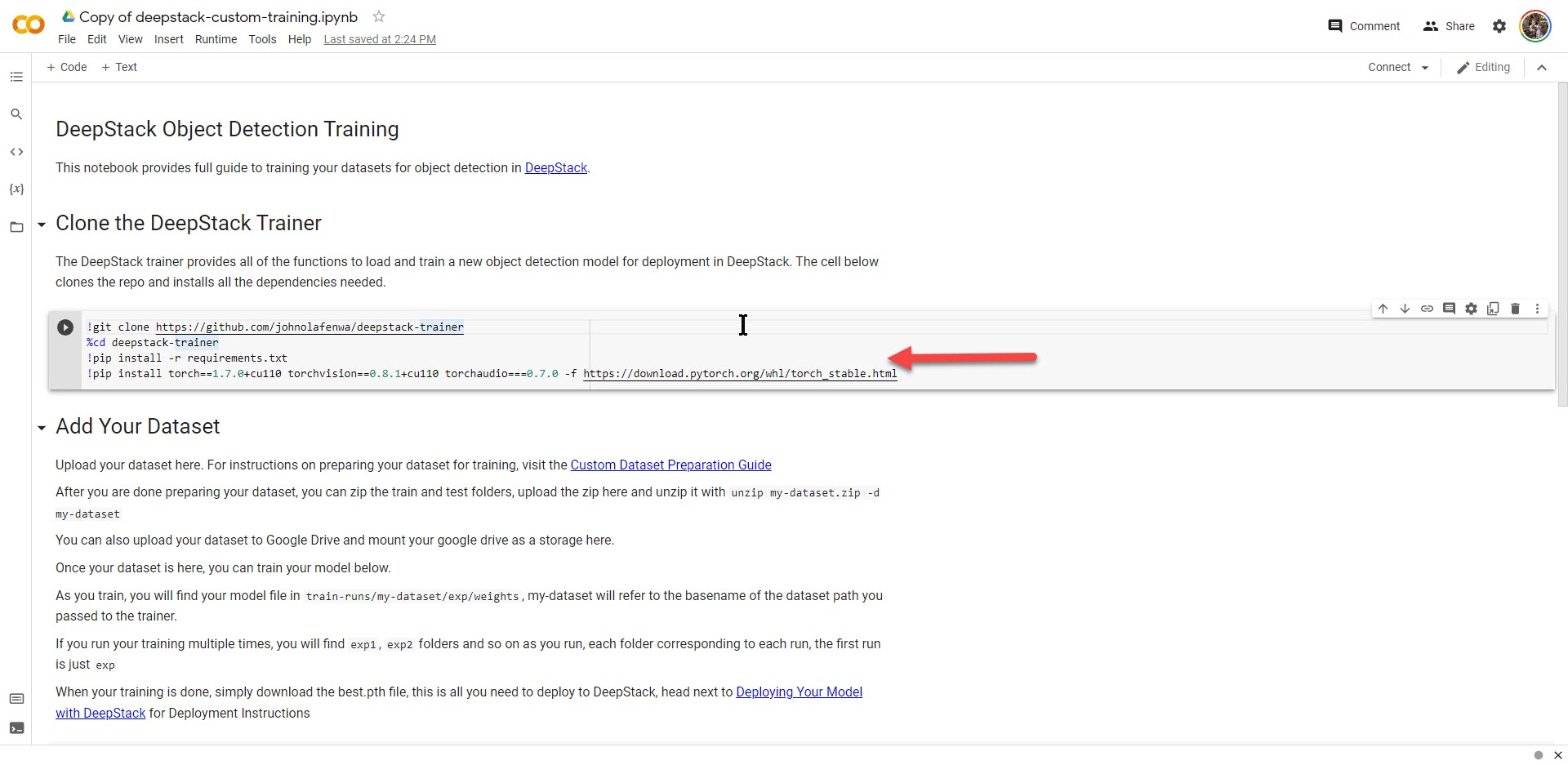
The DeepStack docs mention doing this but they kind of assume you know what you are doing with Colab.

Open My edited copy of their notebook for cloud training. Notebook in this instance means project file not notes on how to do something which might be your first guess looking at it.

Click on copy to drive to get a copy you can edit.

I want to have my data and output persist between runs so I'm mounting my Google Drive for storage.

Go to / click in the mount drive section and press Shift-Enter to run it

Go to / click in the clone trainer section and press Shift-Enter to run it

Section 1
This takes a while. (Mine said 4 minutes.) 
Note it loads old versions of packages so I was left with this error/result:
ERROR: pip's dependency resolver does not currently take into account all the packages that are installed. This behaviour is the source of the following dependency conflicts. torchtext 0.11.0 requires torch==1.10.0, but you have torch 1.7.0+cu110 which is incompatible. Successfully installed dataclasses-0.6 torch-1.7.0+cu110 torchaudio-0.7.0 torchvision-0.8.1+cu110

While this running you can work on preparing your data. See Preparing Your Dataset. If you just want to try it before creating your own data set you can find mine here. It is the one I'll building on to detect the wildlife types I have here.

Finally run the Add Your Dataset section which will take a fair bit of time. My set of 91 images took ~30 seconds per run and the default is 300 runs.

Note if you do not scroll the output often enough you will get a popup asking if you are still there. At which point I think it pauses your processing till you respond. So do not leave it to run overnight and expect to be done in the morning.

I finally got this result
     Epoch   gpu_mem       box       obj       cls     total   targets  img_size
   299/299     9.26G   0.01827    0.0114  0.001359   0.03103        59       640: 100% 6/6 [00:30<00:00,  5.07s/it]
               Class      Images     Targets           P           R      mAP@.5  mAP@.5:.95: 100% 1/1 [00:00<00:00,  2.16it/s]
                 all          11           0           0           0           0           0
/usr/local/lib/python3.7/dist-packages/seaborn/matrix.py:198: RuntimeWarning: All-NaN slice encountered
  vmin = np.nanmin(calc_data)
/usr/local/lib/python3.7/dist-packages/seaborn/matrix.py:203: RuntimeWarning: All-NaN slice encountered
  vmax = np.nanmax(calc_data)
Exception in thread Thread-10:
Traceback (most recent call last):
  File "/usr/lib/python3.7/threading.py", line 926, in _bootstrap_inner
    self.run()
  File "/usr/lib/python3.7/threading.py", line 870, in run
    self._target(*self._args, **self._kwargs)
  File "/content/deepstack-trainer/utils/plots.py", line 122, in plot_images
    colors = color_list()  # list of colors
  File "/content/deepstack-trainer/utils/plots.py", line 32, in color_list
    return [hex2rgb(h) for h in plt.rcParams['axes.prop_cycle'].by_key()['color']]
  File "/content/deepstack-trainer/utils/plots.py", line 32, in <listcomp>
    return [hex2rgb(h) for h in plt.rcParams['axes.prop_cycle'].by_key()['color']]
  File "/content/deepstack-trainer/utils/plots.py", line 30, in hex2rgb
    return tuple(int(h[1 + i:1 + i + 2], 16) for i in (0, 2, 4))
  File "/content/deepstack-trainer/utils/plots.py", line 30, in <genexpr>
    return tuple(int(h[1 + i:1 + i + 2], 16) for i in (0, 2, 4))
TypeError: int() can't convert non-string with explicit base

Exception in thread Thread-11:
Traceback (most recent call last):
  File "/usr/lib/python3.7/threading.py", line 926, in _bootstrap_inner
    self.run()
  File "/usr/lib/python3.7/threading.py", line 870, in run
    self._target(*self._args, **self._kwargs)
  File "/content/deepstack-trainer/utils/plots.py", line 122, in plot_images
    colors = color_list()  # list of colors
  File "/content/deepstack-trainer/utils/plots.py", line 32, in color_list
    return [hex2rgb(h) for h in plt.rcParams['axes.prop_cycle'].by_key()['color']]
  File "/content/deepstack-trainer/utils/plots.py", line 32, in <listcomp>
    return [hex2rgb(h) for h in plt.rcParams['axes.prop_cycle'].by_key()['color']]
  File "/content/deepstack-trainer/utils/plots.py", line 30, in hex2rgb
    return tuple(int(h[1 + i:1 + i + 2], 16) for i in (0, 2, 4))
  File "/content/deepstack-trainer/utils/plots.py", line 30, in <genexpr>
    return tuple(int(h[1 + i:1 + i + 2], 16) for i in (0, 2, 4))
TypeError: int() can't convert non-string with explicit base

Optimizer stripped from train-runs/deepstack/exp/weights/last.pt, 43.4MB
Optimizer stripped from train-runs/deepstack/exp/weights/best.pt, 43.4MB
300 epochs completed in 2.973 hours.

best.pt is the model file to deploy.

Option 3 local Colab

The basic instructions are here

Note in step 3

jupyter notebook \

  --NotebookApp.allow_origin='https://colab.research.google.com' \

  --port=8888 \

  --NotebookApp.port_retries=0

Needs to be entered as one line and should be run from the deepstack-trainer folder.

jupyter notebook --NotebookApp.allow_origin='https://colab.research.google.com' --port=8888 --NotebookApp.port_retries=0

 Step 3.1 open My edited copy of their notebook modified for local then connect it to the local runtime using the localhost URL provided in step 3.

The output looked way different running with torch-1.9.1+cu111 torchaudio-0.9.1 torchtext-0.10.1 torchvision-0.10.1+cu111 (see below). It appears most of it goes to a log with this version so nothing appears to be happening till it is done. My test run that took almost 3 hours on Googles free service took only 18 minutes on my workstation and it was not even working hard. The CPU maxed at 40% and the GPU ~20% so you would think with a bit of tweaking I could get this a lot faster but so far it foes not seem so. 

Analyzing anchors... anchors/target = 6.14, Best Possible Recall (BPR) = 1.0000

                 all          91         194           0           0    9.47e-05    1.55e-05

                 all          91         194           0           0    0.000156    2.51e-05

                 all          91         194           0           0    0.000471    6.89e-05

                 all          91         194           0           0    0.000664    9.94e-05

                 all          91         194           0           0     0.00113    0.000169

                 all          91         194           0           0     0.00215    0.000336

                 all          91         194           0           0     0.00499    0.000759

                 all          91         194           0           0     0.00892     0.00153

                 all          91         194           0           0       0.012     0.00207

                 all          91         194           0           0      0.0283     0.00598

                 all          91         194           0           0      0.0397     0.00772

                 all          91         194        0.25     0.00149       0.105      0.0278

                 all          91         194        0.25     0.00326       0.146      0.0542

                 all          91         194       0.188       0.109       0.167      0.0587

                 all          91         194       0.114       0.207       0.194      0.0732

                 all          91         194       0.061       0.222       0.189      0.0556

                 all          91         194      0.0287       0.225       0.181       0.038

                 all          91         194      0.0268       0.234       0.192      0.0571

                 all          91         194      0.0245        0.24       0.175      0.0635

                 all          91         194      0.0165       0.241        0.15      0.0381

                 all          91         194      0.0215       0.241       0.188      0.0603

                 all          91         194       0.027       0.244       0.216      0.0796

                 all          91         194       0.038       0.244       0.231       0.115

                 all          91         194      0.0331       0.241       0.214      0.0931

                 all          91         194      0.0564       0.241       0.244       0.118

                 all          91         194      0.0638       0.247        0.25        0.13

                 all          91         194      0.0549       0.247        0.27       0.145

                 all          91         194      0.0402       0.244       0.218      0.0846

                 all          91         194      0.0223       0.246      0.0761      0.0152

                 all          91         194       0.279       0.267       0.144      0.0462

                 all          91         194      0.0447       0.243       0.183      0.0504

                 all          91         194      0.0497        0.24       0.198      0.0843

                 all          91         194      0.0476       0.247       0.213      0.0978

                 all          91         194        0.29       0.262       0.131      0.0396

                 all          91         194       0.045       0.246       0.152      0.0391

                 all          91         194      0.0373       0.247       0.142      0.0391

                 all          91         194      0.0568       0.247        0.24      0.0719

                 all          91         194      0.0454       0.247       0.155      0.0774

                 all          91         194       0.295       0.271       0.188      0.0499

                 all          91         194      0.0537       0.249       0.235      0.0776

                 all          91         194      0.0486       0.249       0.206      0.0565

                 all          91         194      0.0505       0.249       0.296       0.114

                 all          91         194      0.0563       0.246       0.311        0.11

                 all          91         194      0.0439       0.247       0.265       0.067

                 all          91         194       0.134       0.262       0.331       0.109

                 all          91         194       0.307       0.266       0.315       0.116

                 all          91         194       0.553       0.292       0.301       0.123

                 all          91         194       0.547       0.292       0.384       0.161

                 all          91         194       0.576        0.29       0.418       0.211

                 all          91         194       0.555       0.393       0.511       0.236

                 all          91         194       0.838       0.446       0.567        0.25

                 all          91         194       0.576       0.326         0.5        0.25

                 all          91         194        0.54       0.395       0.453       0.157

                 all          91         194       0.372       0.382        0.46       0.239

                 all          91         194       0.626        0.43       0.413       0.171

                 all          91         194       0.683       0.587       0.622       0.353

                 all          91         194       0.627       0.589       0.586       0.239

                 all          91         194        0.62       0.608       0.603       0.277

                 all          91         194       0.656        0.66       0.656       0.313

                 all          91         194       0.676       0.764       0.674       0.276

                 all          91         194       0.759       0.741       0.755       0.453

                 all          91         194       0.651       0.744       0.741       0.314

                 all          91         194       0.641       0.786       0.702       0.238

                 all          91         194       0.562       0.807       0.662       0.292

                 all          91         194        0.61       0.805       0.747       0.355

                 all          91         194       0.642       0.783       0.737       0.356

                 all          91         194       0.578       0.783       0.702       0.333

                 all          91         194       0.307        0.68       0.657       0.391

                 all          91         194       0.241       0.682       0.654       0.324

                 all          91         194       0.286       0.682       0.678       0.358

                 all          91         194       0.531       0.805       0.731       0.416

                 all          91         194       0.481       0.805       0.677       0.314

Using torch 1.9.1+cu111 CUDA:0 (NVIDIA GeForce RTX 3080, 10240MB)


Namespace(model='yolov5m', classes='', dataset_path='../deepstack/train', hyp='data/hyp.scratch.yaml', epochs=300, batch_size=16, img_size=[640, 640], rect=False, resume=False, nosave=False, notest=False, noautoanchor=False, evolve=False, bucket='', cache_images=False, image_weights=False, device='', multi_scale=False, single_cls=False, adam=False, sync_bn=False, local_rank=-1, log_imgs=16, workers=8, project='train-runs/train', name='exp', exist_ok=False, cfg='.\\models\\yolov5m.yaml', weights='yolov5m.pt', data={'train': '../deepstack/train', 'val': '../deepstack/train', 'nc': 5, 'names': ['pig', 'raccoon', 'coyote', 'squirrel', '']}, total_batch_size=16, world_size=1, global_rank=-1, save_dir='train-runs\\train\\exp2')

Start Tensorboard with "tensorboard --logdir train-runs/train", view at http://localhost:6006/

Hyperparameters {'lr0': 0.01, 'lrf': 0.2, 'momentum': 0.937, 'weight_decay': 0.0005, 'warmup_epochs': 3.0, 'warmup_momentum': 0.8, 'warmup_bias_lr': 0.1, 'box': 0.05, 'cls': 0.5, 'cls_pw': 1.0, 'obj': 1.0, 'obj_pw': 1.0, 'iou_t': 0.2, 'anchor_t': 4.0, 'fl_gamma': 0.0, 'hsv_h': 0.015, 'hsv_s': 0.7, 'hsv_v': 0.4, 'degrees': 0.0, 'translate': 0.1, 'scale': 0.5, 'shear': 0.0, 'perspective': 0.0, 'flipud': 0.0, 'fliplr': 0.5, 'mosaic': 1.0, 'mixup': 0.0}

Overriding model.yaml nc=80 with nc=5


                 from  n    params  module                                  arguments                     

  0                -1  1      5280  models.common.Focus                     [3, 48, 3]                    

  1                -1  1     41664  models.common.Conv                      [48, 96, 3, 2]                

  2                -1  1     67680  models.common.BottleneckCSP             [96, 96, 2]                   

  3                -1  1    166272  models.common.Conv                      [96, 192, 3, 2]               

  4                -1  1    639168  models.common.BottleneckCSP             [192, 192, 6]                 

  5                -1  1    664320  models.common.Conv                      [192, 384, 3, 2]              

  6                -1  1   2550144  models.common.BottleneckCSP             [384, 384, 6]                 

  7                -1  1   2655744  models.common.Conv                      [384, 768, 3, 2]              

  8                -1  1   1476864  models.common.SPP                       [768, 768, [5, 9, 13]]        

  9                -1  1   4283136  models.common.BottleneckCSP             [768, 768, 2, False]                           all          91         194       0.372       0.805       0.689       0.361

                 all          91         194       0.418       0.828       0.735       0.343

                 all          91         194       0.347       0.852       0.682       0.306

                 all          91         194       0.411       0.875       0.772       0.474

                 all          91         194       0.395       0.875       0.741       0.362

                 all          91         194       0.387       0.875        0.68       0.347

                 all          91         194       0.384       0.875       0.768       0.368

                 all          91         194       0.335       0.875       0.632       0.248

                 all          91         194       0.405       0.875       0.702       0.386

                 all          91         194       0.387       0.875       0.739       0.427

                 all          91         194       0.453       0.875       0.719       0.371

                 all          91         194        0.37       0.875       0.664       0.322

                 all          91         194       0.303       0.875       0.639       0.273

                 all          91         194        0.32       0.875       0.656       0.173

                 all          91         194       0.317       0.874       0.629         0.2

                 all          91         194       0.325       0.874       0.685       0.351

                 all          91         194       0.268       0.874       0.664        0.31

                 all          91         194       0.271       0.875       0.668       0.286

                 all          91         194       0.297       0.875       0.614       0.244

                 all          91         194       0.292       0.875       0.638       0.273

                 all          91         194       0.342       0.875       0.714       0.374

                 all          91         194       0.325       0.875       0.683       0.313

                 all          91         194       0.313       0.875       0.652       0.393

                 all          91         194       0.274       0.875       0.642       0.211

                 all          91         194       0.231       0.875       0.613       0.273

                 all          91         194       0.275       0.875       0.619       0.238

                 all          91         194       0.262       0.875       0.625       0.182

                 all          91         194        0.26       0.875       0.636       0.276

                 all          91         194       0.323       0.875       0.728       0.367

                 all          91         194       0.323       0.875       0.733       0.381

                 all          91         194         0.2       0.875       0.613       0.291

                 all          91         194       0.201       0.868       0.631       0.297

                 all          91         194       0.262       0.872       0.634       0.349

                 all          91         194       0.255       0.874        0.65       0.383

                 all          91         194       0.368       0.874       0.712       0.401

                 all          91         194        0.39       0.874       0.751       0.391

                 all          91         194       0.272       0.874       0.657       0.295

                 all          91         194       0.337       0.874       0.664       0.278

                 all          91         194       0.351       0.874       0.696       0.429

                 all          91         194       0.263       0.875       0.703       0.439

                 all          91         194       0.288       0.875       0.718       0.371

                 all          91         194       0.308       0.875       0.762       0.398

                 all          91         194       0.365       0.875       0.748       0.327

                 all          91         194       0.262       0.875       0.678        0.36

                 all          91         194       0.367       0.875       0.739       0.422

                 all          91         194       0.334       0.875       0.801       0.468

                 all          91         194       0.377       0.875         0.8        0.43

                 all          91         194       0.387       0.875       0.724        0.38

                 all          91         194       0.437       0.875       0.713       0.348

                 all          91         194       0.385       0.874       0.681        0.36

                 all          91         194       0.368       0.874         0.7       0.397

                 all          91         194       0.277       0.874       0.676        0.36

                 all          91         194       0.347       0.874        0.71       0.404

                 all          91         194       0.368       0.874       0.783       0.433

                 all          91         194       0.361       0.875       0.777       0.444

                 all          91         194       0.376           1       0.772       0.462

                 all          91         194        0.41           1       0.783       0.406

                 all          91         194       0.391       0.997       0.769       0.448

                 all          91         194       0.463       0.997       0.808       0.467

                 all          91         194       0.478       0.999       0.807       0.515

                 all          91         194       0.443       0.999        0.78       0.462

                 all          91         194        0.45           1       0.803        0.44

                 all          91         194         0.5           1       0.845        0.52

                 all          91         194       0.433           1        0.84       0.509

                 all          91         194       0.536           1       0.834       0.592

                 all          91         194       0.484           1       0.871       0.597

                 all          91         194       0.591           1       0.866       0.571

                 all          91         194       0.608           1       0.822       0.593

                 all          91         194       0.446           1       0.771       0.461

                 all          91         194       0.439           1       0.827       0.525

                 all          91         194       0.476           1       0.801       0.496

                 all          91         194       0.464           1       0.811       0.532

                 all          91         194       0.406           1        0.79       0.485

                 all          91         194       0.456           1       0.835       0.489

                 all          91         194       0.435           1       0.804       0.429

                 all          91         194       0.494           1       0.904       0.572

                 all          91         194       0.352           1       0.863       0.391

                 all          91         194       0.418           1       0.891        0.49

                 all          91         194       0.357           1       0.933       0.583

                 all          91         194       0.454           1       0.931       0.614

                 all          91         194       0.416           1       0.825       0.416

                 all          91         194       0.491           1       0.865       0.484

                 all          91         194       0.474           1        0.85       0.464

                 all          91         194       0.521       0.999       0.882       0.546

                 all          91         194       0.471           1       0.863       0.402

                 all          91         194       0.603           1        0.94       0.605

                 all          91         194       0.582           1       0.915       0.599

                 all          91         194       0.586           1       0.927       0.594

                 all          91         194       0.512           1       0.921       0.529

                 all          91         194       0.556           1       0.946       0.646

                 all          91         194       0.517           1       0.954       0.634

                 all          91         194       0.551           1       0.995       0.722

                 all          91         194       0.555           1       0.976       0.592

                 all          91         194       0.579           1       0.958       0.654

                 all          91         194       0.662       0.977       0.961       0.732

                 all          91         194       0.576        0.99        0.97       0.639

                 all          91         194       0.565       0.984       0.977       0.644

                 all          91         194       0.585           1        0.99       0.677

                 all          91         194       0.522           1       0.992       0.586

                 all          91         194       0.598           1       0.988       0.656

                 all          91         194       0.557           1       0.981       0.698

                 all          91         194       0.608           1       0.992       0.676

                 all          91         194       0.567           1       0.985       0.693

                 all          91         194       0.575           1       0.975       0.657

                 all          91         194       0.582           1       0.982       0.708

                 all          91         194       0.553           1       0.969       0.677

                 all          91         194       0.507           1       0.955        0.64

                 all          91         194       0.552           1       0.964       0.679

                 all          91         194       0.602           1       0.989       0.744

                 all          91         194       0.647           1        0.99       0.773

                 all          91         194       0.532           1       0.981       0.659

                 all          91         194       0.639           1       0.992       0.735

                 all          91         194       0.744           1       0.995       0.806

                 all          91         194       0.746           1       0.995       0.771

                 all          91         194       0.749           1       0.994       0.678

                 all          91         194       0.744           1       0.995       0.733


 10                -1  1    295680  models.common.Conv                      [768, 384, 1, 1]              

 11                -1  1         0  torch.nn.modules.upsampling.Upsample    [None, 2, 'nearest']          

 12           [-1, 6]  1         0  models.common.Concat                    [1]                           

 13                -1  1   1219968  models.common.BottleneckCSP             [768, 384, 2, False]          

 14                -1  1     74112  models.common.Conv                      [384, 192, 1, 1]              

 15                -1  1         0  torch.nn.modules.upsampling.Upsample    [None, 2, 'nearest']          

 16           [-1, 4]  1         0  models.common.Concat                    [1]                           

 17                -1  1    305856  models.common.BottleneckCSP             [384, 192, 2, False]          

 18                -1  1    332160  models.common.Conv                      [192, 192, 3, 2]              

 19          [-1, 14]  1         0  models.common.Concat                    [1]                           

 20                -1  1   1072512  models.common.BottleneckCSP             [384, 384, 2, False]          

 21                -1  1   1327872  models.common.Conv                      [384, 384, 3, 2]              

 22          [-1, 10]  1         0  models.common.Concat                    [1]                           

 23                -1  1   4283136  models.common.BottleneckCSP             [768, 768, 2, False]          

 24      [17, 20, 23]  1     40410  models.yolo.Detect                      [5, [[10, 13, 16, 30, 33, 23], [30, 61, 62, 45, 59, 119], [116, 90, 156, 198, 373, 326]], [192, 384, 768]]

Model Summary: 391 layers, 21501978 parameters, 21501978 gradients, 51.4 GFLOPS


Transferred 506/514 items from yolov5m.pt

Optimizer groups: 86 .bias, 94 conv.weight, 83 other


Scanning '..\deepstack\train.cache' for images and labels... 90 found, 1 missing, 0 empty, 0 corrupted: 100%|##########| 91/91 [00:00<?, ?it/s]

Scanning '..\deepstack\train.cache' for images and labels... 90 found, 1 missing, 0 empty, 0 corrupted: 100%|##########| 91/91 [00:00<?, ?it/s]


Scanning '..\deepstack\train.cache' for images and labels... 90 found, 1 missing, 0 empty, 0 corrupted: 100%|##########| 91/91 [00:00<?, ?it/s]

Scanning '..\deepstack\train.cache' for images and labels... 90 found, 1 missing, 0 empty, 0 corrupted: 100%|##########| 91/91 [00:10<?, ?it/s]

Image sizes 640 train, 640 test

Using 8 dataloader workers

Logging results to train-runs\train\exp2

Starting training for 300 epochs...


     Epoch   gpu_mem       box       obj       cls     total   targets  img_size


  0%|          | 0/6 [00:00<?, ?it/s]

     0/299     5.47G    0.1205   0.03857   0.05545    0.2145        64       640:   0%|          | 0/6 [00:05<?, ?it/s]

     0/299     5.47G    0.1205   0.03857   0.05545    0.2145        64       640:  17%|#6        | 1/6 [00:05<00:27,  5.47s/it]

     0/299     5.65G    0.1196   0.03985   0.05593    0.2154        68       640:  17%|#6        | 1/6 [00:05<00:27,  5.47s/it]

     0/299     5.65G    0.1196   0.03985   0.05593    0.2154        68       640:  33%|###3      | 2/6 [00:05<00:09,  2.40s/it]

     0/299     5.65G    0.1193   0.04018   0.05547     0.215        67       640:  33%|###3      | 2/6 [00:05<00:09,  2.40s/it]

     0/299     5.65G    0.1193   0.04018   0.05547     0.215        67       640:  50%|#####     | 3/6 [00:05<00:04,  1.42s/it]

     0/299     5.65G    0.1196   0.03886   0.05546     0.214        53       640:  50%|#####     | 3/6 [00:06<00:04,  1.42s/it]

     0/299     5.65G    0.1196   0.03886   0.05546     0.214        53       640:  67%|######6   | 4/6 [00:06<00:01,  1.04it/s]

     0/299     5.65G    0.1193   0.03866   0.05564    0.2136        60       640:  67%|######6   | 4/6 [00:06<00:01,  1.04it/s]

     0/299     5.65G    0.1193   0.03866   0.05564    0.2136        60       640:  83%|########3 | 5/6 [00:06<00:00,  1.45it/s]

     0/299     4.35G    0.1198   0.03696   0.05567    0.2124        23       640:  83%|########3 | 5/6 [00:08<00:00,  1.45it/s]

     0/299     4.35G    0.1198   0.03696   0.05567    0.2124        23       640: 100%|##########| 6/6 [00:08<00:00,  1.20s/it]

     0/299     4.35G    0.1198   0.03696   0.05567    0.2124        23       640: 100%|##########| 6/6 [00:08<00:00,  1.44s/it]


               Class      Images     Targets           P           R      mAP@.5  mAP@.5:.95:   0%|          | 0/6 [00:00<?, ?it/s]

               Class      Images     Targets           P           R      mAP@.5  mAP@.5:.95:  17%|#6        | 1/6 [00:00<00:04,  1.17it/s]

               Class      Images     Targets           P           R      mAP@.5  mAP@.5:.95:  33%|###3      | 2/6 [00:00<00:01,  2.32it/s]

               Class      Images     Targets           P           R      mAP@.5  mAP@.5:.95:  50%|#####     | 3/6 [00:01<00:00,  3.45it/s]

               Class      Images     Targets           P           R      mAP@.5  mAP@.5:.95:  67%|######6   | 4/6 [00:01<00:00,  4.49it/s]

               Class      Images     Targets           P           R      mAP@.5  mAP@.5:.95:  83%|########3 | 5/6 [00:01<00:00,  5.28it/s]

               Class      Images     Targets           P           R      mAP@.5  mAP@.5:.95: 100%|##########| 6/6 [00:02<00:00,  2.23it/s]

               Class      Images     Targets           P           R      mAP@.5  mAP@.5:.95: 100%|##########| 6/6 [00:02<00:00,  2.59it/s]