Showing posts with label Dahua. Show all posts

Thursday, September 17, 2020

Syncing time

The issue

One of the things suggested to save CPU on Blue Iris is to turn on the in camera overlay instead of having Blue Iris add it while viewing. Note this works most of the time but some instances in camera overlays mess with tools like LPR. But many of the clocks seemed to refuse to keep time. At first I thought it was the local ntp servers having problems and wrote a quick tool to test all my ntp server options. The real issue is I'm finding different models of cameras work with only some ntp servers. In a perfect world this would not be an issue but in the real world they are often off a bit from each other and for syncing of video you want them a close as possible. And it also means you need to know which cam works with which and set them to ones as close in time as possible. Plus I want to avoid uploading packets where possible given my network connection is 900 down with only 40 up and I'm backing up to the cloud contentiously. 

Main options I have to work with are:

  • internet time servers (time.windows.com for instance)
  • ntpd on OPNsense router box 192.168.0.1 using 0.opnsense.pool.ntp.org as source
  • Windows time server on a Blue Iris server 10.10.3.48 using 192.168.0.1 as source
  • NetTime on a Blue Iris server 10.10.3.46 using 192.168.0.1 as source
  • ntp service running on IoT Unifi network gateway 10.10.0.1 using 192.168.0.1 as source

Note just setting the time server you want to use on a Windows 10 PC gets complicated. Microsoft really wants you to use time.windows.com. Detailed instructions to change the server can be found here.


What worked with what

Hikvision

System->System Settings->Time Settings (ColorVu)

Basic Configuration->System->Time Settings (older cams)

Would not even ping most of these. In the end the only one it would connect to was the Windows time server

ColorVu screen shot


Reolink

Network->Advanced->NTP

Only seems to like the OPNsense box. Takes 3 screens to set all the time options.


Amcrest

System->General->Date & Time

Hard to say since there is no test button. You just set it and hope. I'll set them to diff servers and see what keeps time. Though it looks like it might do a sync on save so you can see if something works if the time was off. After a day it appears OPNsense did not seem to work as the time was WAY off.

Used Windows time server 

Dahua

System->General->Date & Time

Like Amcrest (some claim the Dahua makes many of Amcrest cams and the software is very similar) it is hard to say since there is no test button. You just set it and hope. I'll set them to diff servers and see what keeps time. Though it looks like it might do a sync on save so you can see if something works if the time was off. After a day it appears OPNsense did not seem to work as the time was WAY off.

Used Windows time server 

JideTech

System->Time

Not sure if this is working or not. Comes set to time.windows.com which seemed to be working. When I set it to a local one it changed the date to 2036 and stayed there till I "Synced with PC time". Then tried to dup and could not. Set to OPNsense box. After a few days the time seems to be hold so think is OK. Note there is no option to set DST start and stop.  

Foscam

Basic Settings->Camera Time
OPNsense seems to work OK. Note this old enough there is no option to set DST start and stop.

Escam

Again OPNsense seems to work OK. 


Tuesday, September 15, 2020

Quick outdoor audio compare

Overview

Been seeing posts wanting cams with audio lately. My Ring compares playlist has some examples of the diff between a ColorVu and a Ring doorbell that contain audio but when outside doing a bit of weeding around the bird feeder and hearing coyotes playing near by I thought I'd grab the footage form 3 near by cameras to show the diff between them.

The 3 cameras are:

Dahua IPC-HDW4631C-A mounted under the window AC unit

Reolink RLC-511-5MP mounted on side window frame

Hikvision (ColorVu) DS-2CD2347G1-LU (far one) mounted on the soffit at the corner of the roof

Placement of cameras

The links to the videos are:

  • The Dahua video
  • The Reolink video
  • The Hikvision/ColorVu video


If you watch the lower timestamp you should hear:

  • Various bird calls and till 11:28:40
  • @11:28:40 you should hear my footsteps and the hedge trimmer starting up.
  • @11:29:37 you should hear me walking through the dried "weeds" crunching them and a jet passing overhead. Then me tossing the branches into a pile off screen.
  • @11:29:58 I start using the hedge trimmer again.
  • @11:30:07 I stop and you can hear what sounds like coyotes yapping a few hundred yards away.
  •  @11:30:23 you should hear me say "listen to that" (meaning the coyotes) in a normal speaking voice.

It is totally calm so there is no wind noise to deal with. I should probably do another sample with speaking when there is wind and when the house main AC unit (around the far side of the house) is running. I'm amazed how loud that AC unit sounds on footage compared to when I'm in the yard.


Saturday, September 12, 2020

Fact check: Amcrest cameras are Dahua rebrands.

 I hear people say this a lot but when you try and ping them down they never seem to be able to tell you which model is which. There are post like this one where people claim they have up Dahua firmware on some models of Amcrest cameras which they think implies Dahua made them but they do not know which model. Usually I just don't have the time to look into it with so little to go in. This one claims to have upgraded an Amcrest model I have, the Amcrest IP8M-2496EB, so I thought I'd take a it to see if I could actually find a Dahua model of that cam and if the Amcrest was any cheap or if there was any other reason to buy the Amcrest of just getting the Dahua (if there was on). The firmware mentioned, DH_IPC-HX5X3X-Rhea_MultiLang_NP_Stream3_V2.800.0000014.0.R.191203.zip, is used by a few models.

The Dahua wiki shows 3 8MP bullet models including the IPC-HFW2831T which is one of my current favs. Nothing that looks close to the Amcrest. But I'm not finding my Dahua 6MP model there either so not definitive.


A look at the Dahua product selector seems a bit more promising as it has my 4631 listed but still nothing that looks like the Amcrest. However the IPC-HFW4831E-SE is close and the specs match. The actual case is just a bit different.


A quick google search shows the IPC-HFW4831E-SE can be had for as little as $150 The Amcrest IP8M-2496EB can be had for as little $95. So I guess the main factor is price. But as my tests have shown you are generally better off with the 6MP Dahua IPC-HFW4631H-ZSA for as little as $110 and get a serious zoom and audio too for that extra $15. There does not appear to be an Amcrest equiv of the 6MP Dahua IPC-HFW4631H-ZSA.

If you want to compare the camera software features between the 2 8MP cameras you can get the Dahua manual here and the Amcrest IP8M-2496EB manual here.


So lets try another. The Amcrest IP4M-1026  which has similar low light performance to the Dahua 6MP IPC-HDW4631C-A Note you get 20% more rez plus audio for just $10 more than the Amcrest. The Amcrest it pretty distinctive with its angled shade and case. None of the Dahuas look anything like it. Same goes for the "eyeball" version IP4M-1055E. The closest Dahua match appears to be the IPC-HDW2439T-AS-LED-S2 which appears to be cheaper than the Amcrest.

So we are 1 for 3 which means some of them my indeed be made by the same people that make some of the Dahua cams. If Dahua makes all of its models is still a bit unclear. The Chinese supply chain seems to cross a lot.  But I don't think it matters all that much. Once you sort the specs you want for a cam you can see what models of what brands match up and then see if any one has loaded a more feature rich firmware on it or even give it a try yourself. It seems that in many cases the loader with not load something that will brick the cam though in some cases you might lose a feature you liked and not be able to go back.

You might also want to look at this Wikipedia entry which outlines known Dahua security issues.


Saturday, August 29, 2020

Dahua IPC-HFW2831T-ZAS-S2 vs IPC-HFW4631H-ZSA

Mention in here:

8MP PoE Security IP Camera - OEM IPC-HFW2831T-ZAS-S2 2.7~13.5mm Vari-Focal Lens 5X Optical Zoom, Ultra 4K Bullet Outdoor Starlight Camera with 196.85ft Night Vision,SD Card Slot,H.265,IP67  Specs sheet

6MP Outdoor POE Bullet IP Camera IPC-HFW4631H-ZSA, 2.7-13.5mm Motorized Varifocal Lens, 5X Optical Zoom Security Camera with Built-in Mic, IR 197ft Night Vision, Smart H.265 WDR, SD Card Slot, IP67

Overview

First note, oddly they seem to use diff and conflicting plugins so you can only view the stream from one or the other in IE at the same time.

Second I had a 256 GB SD card from my old LG V30 phone that I had previously used in the SereneLife IPCAMOD47 failure which I tried to use in the IPC-HFW2831T-ZAS-S2  after formatting it but it appeared as 2 drives and failed to format. I did not have a second to 256 GB to try so it might have chosen that time to go bad. Sticking the 256 GB SD back in a Windows 10 PC it says only 47 MB like the second drive listed in the camera now. Sticking a 128 GB into it seems to work OK. I was able to recover the 256 GB SD with SD formatter.

Third you will notice (if you click on the images) the form factors between the 4Ks (3840x2160, Aspect ratio = 1.78) and the 6MP (3072x2048, Aspect ratio = 1.5) are quite diff. Most of the 4K's added pixels are in adding width not height which might factor into you choice.

The tests

One of my Reolink 511s is starting to have moisture issues so I thought it would be a good time to upgrade the IPC-HFW4631H-ZSA with a IPC-HFW2831T-ZAS-S2 and use the IPC-HFW4631H-ZSA to replace the 511. Before that though I wanted to do a quick compare so stick the IPC-HFW2831T-ZAS-S2 next to IPC-HFW4631H-ZSA and captured some video and snapshots from them and the Amcrest IP8M-2496 in the same location to get both zoomed and wide compares. 

Videos

Daytime

These videos the Dahuas start off on max zoom. You can see me stepping off and dropping eye charts at about 50, 100 feet and at the gate about 188 feet from the camera array.  There is an old license plate on the cart I'm pulling for reference too. At about 1:24 PM I start back from the gate. About 1:40 PM both Dahua cameras are zoomed to max view angle to compare with the Amcrest. 

IPC-HFW4631H-ZSA video

IPC-HFW2831T-ZAS-S2 video

IP8M-2496 video

Nighttime with IR

The 6MP looks slightly better to me. Start with just IR lights on (note mainly from IR flood). Shortly after the start the white driveway lights come on the go off just before the end of the video. The driveway lights have almost no affect on the video detail. Passing cars give indications of motion blur affects from the slow shutter speed.

IPC-HFW2831T-ZAS-S2 video

IPC-HFW4631H-ZSA video

Nighttime low light color

The 8MP does way better here. Both cams are set to manual 1/12 exposure, color mode and 0-100 gain range. Otherwise all default settings. Start with just IR lights on, mainly from IR flood, but they seem to have no real affect unlike the HikVision ColorVus that tend to get a purple tint when IR floods are on. About 9:38 PM the white driveway lights come on making a dramatic change in both videos. 

For instance the old school house across the street lit by its own security light is about all you can make out on the 6MP though if you look real close can see where the sky is slightly lighter the trees and shadow on the ground. After the driveway lights come on the detail is better but 50 foot detail is still not as good as in IR night vision. Though past 50 feet it was better in color mode.

By contrast the 8MP actually appears to be in color though again the details are few. You can kind of make out the eye chart silhouette and moon shadows. After the driveway lights come on the detail is almost that of day time. 

Passing cars give indications of motion blur affects from the slow shutter speed. Shortly before the end of the video the driveway lights go back off again showing how quickly the cameras adapt.

IPC-HFW2831T-ZAS-S2 video

IPC-HFW4631H-ZSA video

In pics

The UPS box is at about 160 feet.


You can watch the videos to see how fast the zooms and focusing work but are some quick snaps to see how the cams compare in max zoom. The calculated DORI numbers are


Click on an image to see close to full screen and rapidly switch between.

The 6MP camera view

The 8MP/4K camera view
Just to drive home the diff distance makes, here are views from the cameras mounted about 20 feet from the UPS box. 
View from another Dahua 6MP in widest view mode.

View from an old Foscam FI9804WS 720p cam.

I used the 6MP Dahua and will use the new 8MP cam in max zoom but while I have them all together I though I'd get some wide angle view compares as well. Not e how much the auto focus improves the detail. The 50 foot chart is clearer even to the 6MP camera than the fixed Amcrest 4K. The Dahua 4K is even better. Granted it is also almost twice the cost of the Amcrest.
The Dahua 6MP in widest view

The Amcrest 8MP/4K wide angle view


The Dahua 8MP/4K in widest view

Nighttime with IR

6MP just IR

6MP in IR mode with driveway lights on.

8MP just IR

8MP in IR mode with driveway lights on.


Nighttime low light color

6MP color mode.

6MP in color mode with driveway lights on.

8 color mode

8MP in color mode with driveway lights on.


Saturday, April 4, 2020

ColorVu supplemental light off/on axis tests

As I mentioned in my review HikVision ColorVu cameras the supplemental light is really too bright to use in most cases but it is also lights up pretty much 180 by 180 degrees, which is also an issue if anything is close, so enabling it on a sky cam might be helpful to other near by cams.

Off axis test. 

It is raining with heavy clouds taking the moon out of the picture. The supplemental light settings at times (bottom time stamp) are:

  • 8:47 change from 10 to 50
  • 8:48 change from 50 to 100
  • 8:49 change from 100 to 10


The ColurVu is mounted on the edge of the roof above the bird feeder.
The trees seen to light up on the edge of the view are about 50 feet from the cam on the left to about 33 feet center. The rain helps show some of the limitations of illumination from a camera instead of off axis. Camera is 2.8mm OEM of the Hikvision DS-2CD2347G1-LU I bought off Amazon. (video)

The Amcrest is mounted on the barn 43 feet from the ColorVu. Camera is a IP4M-1026 pushed to the max 1/3 second exposure and max gain. (video)

Dahua mounted about 4 feet behind the ColorVu on the soffit.  Camera is a IPC-HDW4631C-A also pushed to the max 1/3 second exposure and max gain. (video)

No light test.

Cameras are all in the same places as off axis test but ColorVu is angled down to roughly match the view form the Dahua. Also since there is more light I also tested motion with my black dog and me moving about. Moon would have been down to about last quarter but as the lack of any shadows shows it was pretty much obscured by clouds.

The test starts with the back door light on and a ladder in view of the Dahaua cam. The following happens at these times (the lower timestamp):


  • at 8:43 the back door light is turned off and after a few seconds the ColorVu light comes on auto. Note black dog near far corner of house and the kind of purple tint the IR floods give the ColorVu video before the supplemental light kicks in.
  • at 8:44 I turn the ColorVu light off. A few seconds after that I come out to get the ladder with a hat light on so I can see what I'm doing. Note the blur and low frame rate.
  • at 8:46 I go back inside then come back out to walk carefully past with the hat light off
  • at 8:47 I come back, ( I forgot my keys) with the hat light on cause it really is too dark to be walking safely with it off, then go off to feed.
  • at 8:48 my white dog appears at the far corner of the house and wanders about for around 5 minutes. 
  • at 8:53 I come back from feeding, turn my hat light off and wander carefully into the yard a bit to test for motion blur. Note I have to turn my hat light back on to see where I'm stepping part of the time.
  • at 8:55 go back in triggering the back door light to come on.
  • at 8:56 I come back out to do another motion test with the back door light on. Then plug a hole something dug next to the bird feeder.
  • at 8:57 I go back in. Not the cats lurking on the walk way.


ColorVu video
Amcrest video
Dahua video

On axis test

Cameras are all in the same places as off axis test but ColorVu is angled down to roughly match the view form the Dahua. ColorVu camera has the supplemental light set to a fixed value of 10. For this view 10 seemed to be the max I could run the supplemental light at without causing glare that would diminish the view of the stars and distance trees.

22:21 to 22:25 White dog starts by the back door and then wanders the yard.

ColorVu video
Amcrest video
Dahua video


Wednesday, January 29, 2020

Eval:Plate Recognizer in Blue Iris 5


Cams used in the post:


Caveats:

The LPR partnered with Blue Iris 5 is cloud based meaning it uploads triggered pic to a server which is hampered by timing of triggers on top of the quality of  the image sent. Positioning of the cam, lighting and speed of the vehicle will of course factor in. More here. A better solution, if you have the cash, might be OpenLPR which works on streaming video to a local server. Prices range from $5/cam/month to $1995/cam/month. Though I'm thinking the best solution is a cam designed for player reading that has LPR in the cam. That will set you back at least $500 though. Still could be cheaper in the long run and more practical than sending video to a server to process.

Note I and many others have been seeing the web server crash a lot with Blue Iris 5 Going to be waiting to upgrade any more servers till that gets sorts. But till then I though I'd look at the new AI built-ins.

You should turn off any overlays from the camera so the it does not see them as the plate number. And even then there might be issues.

Note only one of these is a license plate. And looking at the uploaded images it appears to have completely missed me going and returning twice today though the config looks unchanged from the last time it worked.

Setup:


BI5 plate recognizer setup instructions. Set up was quick and easy.

First look:

Given I'm just looking to log cars coming in my gate I figured their free tier might be enough. Gets a bit pricey for watching a neighborhood gate or parking lot.

Note the timestamps on the cam pics are UTC like the plate log.

The first thing that hit me was I need to dial my triggers way back so it will only be sending things that are probably cars to stay in the free range. Even though I thought I'd dialed it back pretty good I had 41 alerts in the first 2 1/2 hours I had it turned on. It did get the plate on my while I was pulling out with the trash but not when I pushed it back up the driveway.

First uploaded pic of me on the way out
Last uploaded pic of me with the cart


It did not get the one off a truck that pulled in to turn around after dark either. Though in that case it probably could not have been able to make out the plate since I could not. Should have uploaded a pic though. It think because it did not quite cross zones.
I think the dividing line was just this side of the tires.


So I adjusted the zones again (replaced right 1/3 of 2 full width zones with a third to trigger on people using the turnaround like the truck)  and turned it off for the night.
now with 3 zones. 2 on left 1 on right.
I might want to swap to the gate cam instead as it could see the plate on the truck well from its angle and distance. Though that also means it will be tough not to trip with passing traffic. Especially at night with headlights shining off the gate and trees.

Update 2/4/2020:

Totally missed a neighbor's visit both coming and going in the middle of the day. Plus even weirder it thinks it made out the cameras name as a plate on my work glove as I passed. Again times are UTC where local is UTC-6
Notice no car pics for 2/3 though it did see me.
Me carrying a chainsaw. I guess my movement triggered the LPR and the only text it found was the cameras name overlay.
The neighbor did trigger the BI motion detection 6 times. You can see the first image here along with the 6 clip blank clip icons o the left. (The blank icons is another random issue I've been seeing in BI5.)
Note I pixelated the plate here. It was perfectly clear.
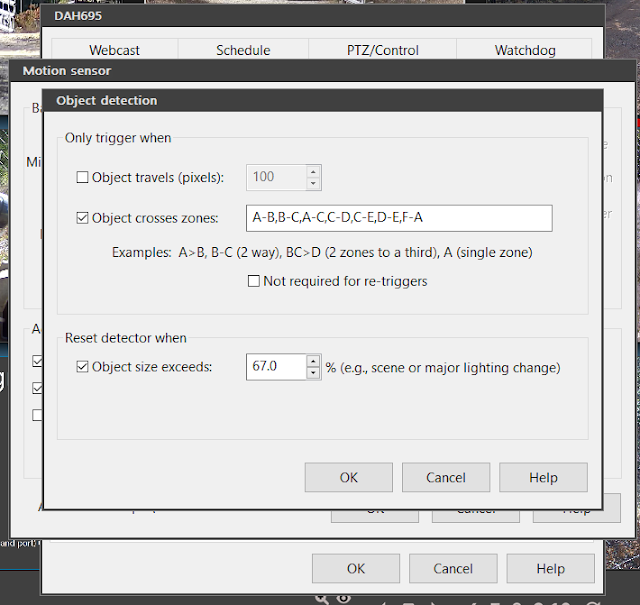
It got me thinking the one trigger point might not be enough so I reduced the 3 zones I have and added 3 more to hopefully trigger earlier and more often in case they are getting dropped or something. Unfortunately all the zones you are not currently editing show up as the same color so they look like one but there are 6, A thru F.
Basically 4 strip zones to catch "vertical" movement and 2 block sections on right to catch going into turn around or on up drive.
With the crossings set up like this. (Note F was added between the road and A which starts at the gate.)


I also cranked the sensitivity a bit from min object size of 675 to 525 which should be about the size of a car at the gate.

One think I did not mention earlier is there is also a motion detector at the gate that triggers the driveway cams as well. It is a bit laggy but unaffected by the headlights going by. So at night I only use that to trigger the LPR by setting a separate profile and scheduling the switch.
Note no motion sensing selected but the LPR AI is configured for this profile as well.
Note the relative to sunrise/sunset option and you can click on "Days" button to select a group of days or a single day.

Update 2/7/2020:

Another gotcha. Not sure how but it appears my LPR config disappeared from both profiles. It posted a pic at 7:28 AM UTC (1:28 AM local the schedule is using) but when I looked to see how it did with today's FedEx delivery there was nothing. And when I checked my settings in BI5 I found the LPR disabled with no config info. The global profile override schedule was still in place. I then noticed the profile number was not in place on the frame as it had been when the schedule was working. Trying to go into the cameras motion detection config seemed to make the app unresponsive till I tried to close the app at which time the motion detection config dialog appeared.
Note blank clips and motion detection preview window
Restarting the console told me an update was ready so I let that install. After the profile indicator was back on the camera frame. The LPR config was still there. Makes me think a subsystem died or such. Note the clip images were still black so I did a DB repair which sorted that. However I found the active part of zone F was inverted. I'll have to keep a closer eye on this and see if there is some more monitoring I can setup.

Update 2/25/2020 New Issue.

Seem to have found a new issue with BI5. Looks like my motion detection quit working on all cams about 3 days ago. Not positive but I think a Blue Iris subsystem died without notification. This is VERY bad. Not only has no LPR posts been made for 3 days but no video was marked with motion events either from BI motion detection or by external triggers. Rebooted box and motion detection is working again but not sure how I can even monitor for this yet.

Update 3/13/2020 swapped out Reolink with Dahua

Moved the 2 Reolink to other locations / servers since BI5 does not seem to like them which seem to have sorted the corrupted and hung video issues. I also let me add trip line triggers from in cam detection to help reduce lag. Unfortunately it has not done much for improving detection as you can see here.
The shot on March 13, 2020, 12:03 a.m. UTC looks almost perfect those the plate was still not clear enough for it to work. 


I think that is about it for this LPR. There are some other options to try on my todo list.


Tuesday, August 20, 2019

Viewing the night sky in color with an Amcrest IP4M-1026, IP4M-1055E, Dahua and HikVision ColorVu

So called Starlight cams seem to be becoming a thing so I thought I'd see what is possible with a camera I already had. You can look at my video Night sky Aug 10th 2019 and Night sky Aug 9th 2019 to see what I'm talking about here. Update: added two Amcrest IP4M-1055E cams to get a 180 view of the southern sky.  Here is a sample sunrise video from the south east cam Sunrise 12/5/2019 at 60X

With a few simple tests the Amcrest IP4M-1026 seemed to have the best low light video and the widest view. Mainly I wanted to try and capture some of the neighborhood's fireworks displays.  My first test with pretty much default settings came out OK with lightning.  It seemed to me it switched to night view earlier than it needed so I played with the options to get the video linked above.

I was surprised how much I could make out by just moonlight. It basically looked like what I would see looking out the window.


Below are the setting I used. You might be able to tweak this a bit further with experimenting but I'm happy with the results.


Though the fireworks capture was pretty much a bust as they were a lot more subdued this year and the few that did make it into were mostly blocked by the trees. Thinking now I'll add another cam to close to double the 118 degree view. Note I also did a test with a GW5747MIC 5MP Optional TWO-Way Audio PoE IP Camera 1.9mm 160° Wide Angle Night Vision Sony Starvis HD 1920P Security Mini Dome 5 Megapixel Built-In Microphone and Micro SD slot, Audio in/out Recording but the view was not only no wider but not as good in low light.

Added video without the Moon to show when it is too dark to even see out you can still see the horizon glow of Austin, the planets, at least 1 star, the bard and trees. Here are compare pics from my cameras that catch bits of the same view all from the same time, 8/21/2019 at 10PM local despite what some of the on screen timestamps say.

Screen grab from the posted video
Snapshot directly from Blue Iris
Snap shot from Reolink RLC-411WS (5MP Version) of west end of barn in sky pic
Snapshot from RLC-511W across south deck. Note plane from video and above Amcrest snapshot is just above far horizon. 

Snapshot from Reolink RLC-511 (non WiFi) of mid drive. Ton of IR down here so any bits not lit are hard to see.
From Hikvision DS-2CD2035-I overlooking the pool area (not currently up). Note when the moon is up you can usually see the horizon in this view.
Just in case you think the Amcrest is optimized for night, here is a snapshot from high noon.
Amcrest IP4M-1026 snapshot of sky with sun skirting top of frame.

Other cams I'm looking at for really low light

Note these are based on specs and or videos but I have not tried them yet. The 0.5 lux Amcrest above blows the 0.01Lux GW Security cam away in real life.

Updates

Amcrest

Unfortunately this is what the Amcrest IP4M-1055E cam looking SE looks like. At first I thought it was just the fog we've had the last couple days. Then maybe dirt on the lens but it turned out to be condensation on the inside of the cam. I was planning on swapping one with a Dahua IPC-HDW4631C-A  anyway for a compare. Dahua claims a rating of  0.06Lux/F1.6( Color,1/3s,30IRE) 0.4Lux/F1.6( Color,1/30s,30IRE). Sellers are claiming as low as 0.002.

Dahua

I've received a IPC-HFW4631H-ZSA Without Dahua logo 6MP IP Camera 2.7-13.5mm Motorized Varifocal Lens Optical Zoom I'll be testing soon. It is going for $109 on Newegg and $118 on AmazonI should note I see a lot of people posting that the Dahua international OEMs are knock offs. They are definitely a lot cheaper. The "English" OEM is $180 on Amazon and Dahua labeled version of this cam from B&H is $288
I must say I'm impressed so far. I mainly got it to see how the zoom and autofocus compared but the low light is damn impressive. You can clearly make out Orion in the Dahua shot below while the Amcrest used above can only see a few stars. Sirius is easy to make out in both and Rigel can be dimly seen in the Amcrest shot. Once you know it is there you can sort of make out Orion in the Amcrest but it is fairly clear in the Dahua shot. Note this is about at moon rise.
Orion constellation clearly visible above weather station
The same shot from the Amcrest IP4M-1026
Here at there is about a half moon high in the sky but some clouds have rolled in too.
In this Dahua shot you can see the moon is just a light in the sky though Sirius is still visible.
The same shot from the Amcrest IP4M-1055E looking SE. The moon looks more like a sphere though the ground objects are basically silhouettes.
The same shot from the Amcrest IP4M-1055E looking SW. You can see Sirius and barn roof can be made out a bit better.
It is an overcast day but here is a day compare.
Dahua shot of sun through the clouds and birds in flight

Almost the same shot from the Amcrest IP4M-1055E looking SW
On the flip side though if you are thinking of monitoring your yard in color at night you should look at this video of the Dahua being manually switched from color to night / IR mode to get a feel for if you have enough light to make that viable. I'll be adding more videos to the Dahua playlist.


HikVision ColorVu

It is just amazing. See this post for more.