Showing posts with label zoom. Show all posts

Tuesday, December 17, 2019

Pan, Tilt and Zoom worth the money?

In my experience, Pan / Tilts and zoomables as a rule are generally a waste of money unless you are actively monitoring them. After all that was what they were designed for originally. Panning cams were a way to reduce costs back when panning motors were a lot cheaper than cams. These days though with cameras so cheap, even if you are monitoring your cams you generally want as much coverage as you can get with software alerting you to motion or openings where there should be none.

Realistically at home you are not going to be monitoring your cams. Even though I have dedicated monitors so I can see what triggered an alert or what the dogs are going on about, I am still mostly looking at what happened, not what is happening. I have a few PTLs and 1 PTZ. Except for the Wyze Pan I bought to try the tracking, they are all older cams bought before I found I virtually never move them. At the moment I have 2 PTLs are in the main living area (open plan kitchen, dining and living rooms) and I'm thinking of replacing them with wider, higher rez cams and moving the PTLs to the shop where I might want to look about without having to go down there. Mainly to upgrade the shop cams though. I need better coverage in my main living area to track "things" the cat brings in to play with to their hiding places. The PTZ in in the garage I've mounted several places from using it to monitor the gate but decided and Escam QD900 with a 12 mm lens did better. To the north power so I could try and see what the dogs were barking at but it kept going offline. To the garage where I'm replacing it with a GW Security GW5747MIC which covers almost the same area the PTZ can be pointed at almost the same level of detail as the Foscam FI9828P zoomed all the way in. Next stop will probably be in or under the shop though the barn might be a good spot as well to be able to center and zoom on things.

Now I do have a few others that are remotely zoomable but mainly for the autofocus feature they need to support that. If you are looking at close and far targets in the same view, autofocus can make a big difference.

BTW my original pan was a fixed bullet mounted on an antenna rotor. No night vision but it was high tech for a home cam back in the late 1990s.

An example:

DS-2DE4A425IW-DE with sample videos. $489 to $900
Amazon link Newegg link

What you are really paying for is the 25x zoom (120mm lens) and the autotracking. These are designed for use in places like a parking lot after hours were someone monitoring the system can use them to get detail and hopefully track things the monitoring person might not notice. Some high end systems claim to direct PTZs like this based on detected movement form other cameras and sensors. (See below.) But many people seem to think they can use a camera like this instead of covering an area with multiple cameras. Despite what the ads imply I'm still waiting to see a video where a camera actually tracks an object well. Much less deals with multiple moving objects. The wider arc you try and monitor with one of these the worse the results. Note too even if tracking includes zoom, zooming in is optical which limits the field of view and requires time to refocus the image. 

For the equiv money, you could get 4 to 10 cameras in the 4 to 8 MP range setup to cover the the same area at various zoom levels and be pretty much guaranteed to see the object the whole time it would have been visible from the location. And at probably close to the same level of detail while the object is moving. This is closer to the modern WAMI approach to monitoring that assumes multiple objects may need tracked at a time. Granted the NVR required to handle the video will be need to be more powerful but you will get the shot you need and probably save money. Here is an example of tracking a guy looking for stuff to steal on my property after the fact.  While it looks like the kind of videos the tracking cams claim to do it is zoomed and panned in post with views from 5 cameras. For most of it the odds are pretty low a "tracking" cam would have followed him without predictive level AI smart enough to look for him on the other side of an obstruction.

Integrated systems

Now it would be awesome to have some cams like the DS-2DE4A425IW-DE mounted above the roof and tied in to my system to track and zoom in for detail using the other cams and sensors as a guide but that is some pretty high end linkage there to do right. My current system links PIR motion sensors and alarm contact sensors to highlight camera on consoles, mark the video from the linked cams and in some cases even switch the main video feed to the triggered console. This gets me most of the way there and is basically a freebie with my Blue Iris servers being linked to my Homeseer home automation setup. In theory I could integrate some of them to really be worth the cost the system would need tighter integration like the systems that direct PTZ cams to an area based on sensors and triggered cameras which is a costly and is probably best left to pros to get working right.

TODO: find web page again that showed a system with PTZs being triggered by static cams and PIR sensors.

A note about other sensor options

And then there are these

Dahua's 8 x 2MP Multi-sensor Panoramic + PTZ Network Camera which has a 4MP surrounded by 8 2MP cams so the camera has a constant 360 view with a linked PTZ to center and zoom up to 40x on a moving object using their Smart Track linking system. Note this is $7000 camera though there are people claiming on sites like eBay that they will sell you one for as little as $2000. Again this basically gives you a 2 MP panorama with hopefully good detail IF it is tracking the right object. 

Digital Watchdog MEGApix PANO 48MP Outdoor Dome Camera 4 linked 12 MP cams in a single case to give a 180 panorama view. Just $3120

And all these 20MP options.

Second opinions:


Monday, November 25, 2019

Reolink 511 vs Amcrest IP8M-2496 (5MP autofocus vs 8MP fixed)

I look like a bad cable might have killed the Amcrest IP8M-2496 I had pointed at the north yard. I was thinking I might want to swap it with a Reolink 511 anyway as I had a couple spares. With all the posts suggesting 4K (8MP) cams I thought this would be another good compare of 5MP autofocus vs 8MP. Or how rez does not make up for proper focus. Since the Amcrest died the shots are not exact compares but are from the same time on two consecutive night so damn close. Ignore the on screen times. The Reolink seems to be on PST. Bost cams were tweaked a bit to get the best looking video though not that far off default values.

The old cam is the Amcrest UltraHD 4K (8MP) Outdoor Bullet POE IP Camera, 3840x2160, 131ft NightVision, 2.8mm Lens, IP67 Weatherproof, MicroSD Recording, White (IP8M-2496EW-28MM) which according to specs has a 112 degree horizontal view angle and 0.06 Lux/F1.6(Color,1/3s,30IRE) 0.3 Lux/F1.6( Color,1/30s,30IRE) low light rating. And went for about $110 new.

The replacement is the Reolink PoE Camera 5MP Super HD 4X Optical Zoom Outdoor Indoor Video Surveillance Work with Google Assistant, IP Security IR Night Vision Motion Detection with Phone App RLC-511 which claims a 90 degree horizontal view angle but give no low light info other the 0 Lux with IR on. And as I'm writing this is going for $71 on Amazon.

First at high noon. You can see the view is a bit wider in the Amcrest though not as clear. Especially in the shadows. Note the white dog in the Amcrest shot is not easier to see than the black dog in the Reolink shot.
Amcrest at noon
Reolink at noon
Zoomed in to roughly the same section of dirt.
The Amcrest zoomed in. Note the black dog behind the white one. You might not even notice it if not looking for it.
Reolink zoomed in a bit more than the Amcrest. The black dog is almost the same spot as in the Amcrest shot though facing the other way.

How about an early morning shot just as the cam flips to color mode? In this one it is a tougher call but the Amcrest might be a bit better.

Reolink early morning

Amcrest early morning
On IR the Amcrest is better close in but the Reolink kills it in the darker areas. Note there is an IR flood on the side of the house near the dog.
Amcrest IR shot. White dog in front of tree.

Reolink IR shot. White dog on walkway near IR flood.
As a compare and to kind of take the cams IRs out of the equation here is a shot from the Reolink with the cams IR LEDs off. I wish I'd saved a similar shot from the Amcrest when I installed the IR flood.

Sunday, November 24, 2019

GW Security GW5747MIC

 I did a test with a GW5747MIC 5MP Optional TWO-Way Audio PoE IP Camera 1.9mm 160° Wide Angle Night Vision Sony Starvis HD 1920P Security Mini Dome 5 Megapixel Built-In Microphone and Micro SD slot, Audio in/out Recording but the view was not only no wider but not as good in low light as the Amcrest IP4M-1026 despite it having the lowest lux spec so I stuck it looking at the bird feeder. It is also does not have the 160 view angle. Here are some compare shots at the point the cams pointed at the bird feeders flipped from day to night mode.
The supposed 0.01Lux (F1.8, Color) GW Security GW5747MIC flips to night mode first
Flipped at 17:43:42.
A Hikvision DS-2CD2142FWD-I speced at 0.07 lux @ (F1.2, AGC ON)
Flipped at 17:45:38
An Escam QD900 rated Color: 0.1 Lux/F1.2, B/W: 0.01 Lux/F1.2 Note you can see the Microseven on the barn has already flipped to night mode.
Flipped to B/W at 17:51:23
Lastly an Amcrest IP3M-956 rated at 0.1Lux /F2.0 (Color)
Flipped last at 17:54:25
After dark things were not much better. Though part of the problem here is the GW cam is smaller so sees the wall and AC unit that the Amcrest, right next to it, does not.
GW5747MIC at midnight


IP3M-956 at midnight. Note the dome is already dirty again so there is glare.
In the daytime it looks about as good as the Amcrest despite being a lower rez. Note it is only speced as 100 degree view angle. You can see here the GW cam is about the same view angle so not way it is 160 degree.
IP3M-956 about noon
GW5747MIC about noon

I've decided to move all the dome cams inside since they get dirty and pick up reflections real quick (see pic above) so I moved the GW5747MIC to the garage to replace the Foscam FI9828P. The GW5747MIC does have better night vision than the Foscam on top of better rez and view angle. The GW5747MIC can monitor almost the whole garage at the same level of detail without the need for pan and tilt. Though the Foscam can still zoom into get a bit better shot if you are watching and can center and zoom quick enough to get the shot. All in all it seems like a pretty good fit for the garage though realistically I doubt I'd buy another one if this one went out or I need a cam for a similar area.

First though I noticed the diff between the top two rez settings seems to be that is stretches the picture vertically. You will notice here that both show the same amount of the garage. Yes I know it is a mess. Note is a two car garage though it looks more like a 1 1/2 in the pics.

shot in 2592x1944 mode

shot in 2592x1520 mode


Similar shot from the FI9828P
FI9828P zoomed all the way into the corner
Similar post zoomed image from the GW5747MIC
When I turn off the over head light and just have the opener light on the Foscam has to go into night mode though the GW5747MIC does not even in the default Auto switching mode.
GW5747MIC with just the door light.

FI9828P with just the door light
Lastly compare shots with all lights off.
GW5747MIC in the dark

FI9828P in the dark.
Note you can stretch the flip to night mode some more by switching from Auto to Auto(inter sync) though you will some more graininess during the extended color period. adjust the sliders for the right compromise between seeing color and grain.


This is about the max you can push the flip. With THR. of day much lower it will flip back and forth.
Update: Notice something else today. After upgrading my router to one I could turn IPS on without cooking it I discovered this camera is making DNS requests to several sites around the world. Not that I let DNS requests go anywhere from my IoT networks except to my local DNS servers. A quick google shows this is not a new thing with them.

Sunday, August 11, 2019

Doing the math on pixels per inch at a distance for your cam

If you think zoom and enhance is a real thing I have some bad news for you. You can guestimate a pixel that might come between two but that is not really adding detail. It is just making it bigger. Even with some sort of fancy AI like in No Way Out it is just going to convert the image to something like you expect to see. Like seeing faces in the clouds. Just think about it and it should be obvious, pixels can not magically resolve into something the camera did not see. The best you can do is monkey with contrast and brightness and maybe a bit motion fix if you are luck. So you need a minimum of in focus pixels snapped at a high enough shutter to reduce motion blur with enough light and or sensitivity to have the contrast to work with.

Yet I'm still seeing a lot of posts where people are talking up static focus 1080p cams with wide angle for outdoors. Let's do the math on that. There is a simple calculator online to get the width of the area being viewed by a cam with a given view angle. For example let's take my old work horse the Foscam 9800 series that is 720p and 70 deg view angle.

So at 20 feet the view width is 24.4 feet or 293 inches. 720p resolution is actually 1,280 pixels so when we divide the pixels by the view width you get  4.3686 pixels per inch. So a face, about 6 inches wide will be 26 pixels across at 20 feet with this cam. 40 is considered to be the min. So even with the best lens focused for 20 feet this is still not going to cut it.

For convenience I worked up the charts below from my compare sheet. Note these charts assume the camera is focused for the target distance and not the upscaled resolution some cams advertise. Despite claims, outdoor fixed focus cams seem to be focused at around 20 to 30 feet. You might get a "decent 2X screen grab" of targets within +- 10 feet of that. Of course for a large range of  depth you really should look at a camera with auto focus like the Reolink RLC-411WS I've tried. Though it has had the occasional glitch as well. For long distance something adjustable like the Microseven 6-22mm 3MP Manual Zoom Varifocal Len HD 1080P. Or to get an idea of what you might be able to see with a certain model in your location try IPVM calculator which lest you stick a cam on a map of your property to see what the view angle looks like and has simulated day and night shots at the distance you give.


Not those are best case numbers under perfect conditions. While 7 pixels per inch is bare min 14 is the more accepted min. If I change the wanted pixels per inch to 14 the last chart becomes

Note 12 degrees is a fairly extreme telephoto lens in the range of 22mm
70 is standard though up to 90
between 90 and 130 is often called wide angle
180 to 360 are often called 360 view cameras

For a more indepth info look here.

For a visual compare here I am about 33 feet from the cameras.
First an old Foscam FI9804PS 720p and 70 degree view angle

Now compare that with a Reolink RLC-511-5MP with auto focus but zoommed to widest view of about 90 degrees.

We can obviously see a lot more  and it looks clearer. Just for comparison here is the view from a 1080p  M7B77-WPSV1 at max zoom to a view of about 12 degrees located about 190 feet way.

The main diff appears to be the angle .

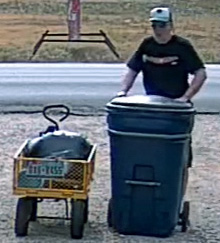
Now crop the images down to just me and the cart and make them the same size for a recognition compare. Note the sizing is done by the browser. You might interpret a bit more with a smart resize.

The Foscam image cropped
The Reolink image cropped

Lastly the Microseven image cropped.
So a 1080p cam with a 12 degree angle and focused for distance yet almost 6 times the distance away would be better for pulling a plate at the gate than the 720p with 70 degree view. Obviously the 5MP at the gate wins though probably by not as much as you would have thought. I should note here too the Foscam was only doing about 1 fps till I ran power out there so I hook up and access point via Ethernet Over Power. I did that so I could stick a Wyzecam V2 out there but that was a bust. Given its 110 degree view you get a shot like this.

First here is the Foscam from the Wyze compare test. I'm a bit further out in this one about 60 feet from the cams. You can see the zoomed Reolink image behind it. Note images were resized to match width of widest image (the Roelink).

Here is the save shot form the Wyzecam V2

And the uncovered Reolink zoomed to its max of 31 degrees horizontal.
Note the glitch in the pic turned out to be a config Blue Iris issue. Inspect sets it to be a generic RTSP and you want to set it as a Reolink.
And lastly a similar shot with the Reolink unzoomed.

In case you are wondering here are some shot with me much closer.
Foscam shot of me at the parcel box
Wyzecam V2 shot of me at the parcel box

One last distance compare back down the drive about 85 feet from the cams. Between the Microseven still zoomed the max.

And an Amcrest 4K IP8M-2496EB with about 112 degree view angle.

For those that think you can just zoom in, here is what you see if you zoom in to match the Microseven.

But there is one more factor to consider, focus. Autofocus can add a lot though when it gets it wrong it can make your cam useless too. Here is a close up shot with the Foscam where I'm just 7 feet away. The cart maybe double that.
Note the plate looks good but the logo on my cap is blurry. I'm too close for the range this cam is set too.
Here is the same shot from the Reolink zoomed out to the max.
Notice both my face and the plate are in focus because the camera has adjusted.
The down side, something flying too close to the lens can leave you looking like this.